The Best Conference Room Solutions to End Your Tech Headaches
The Best Conference Room Solutions to End Your Tech Headaches
Why the Right Conference Room Solutions Matter More Than Ever
Conference room solutions are the hardware and software setups that make meetings run smoothly — whether your team is fully in-office, fully remote, or somewhere in between.
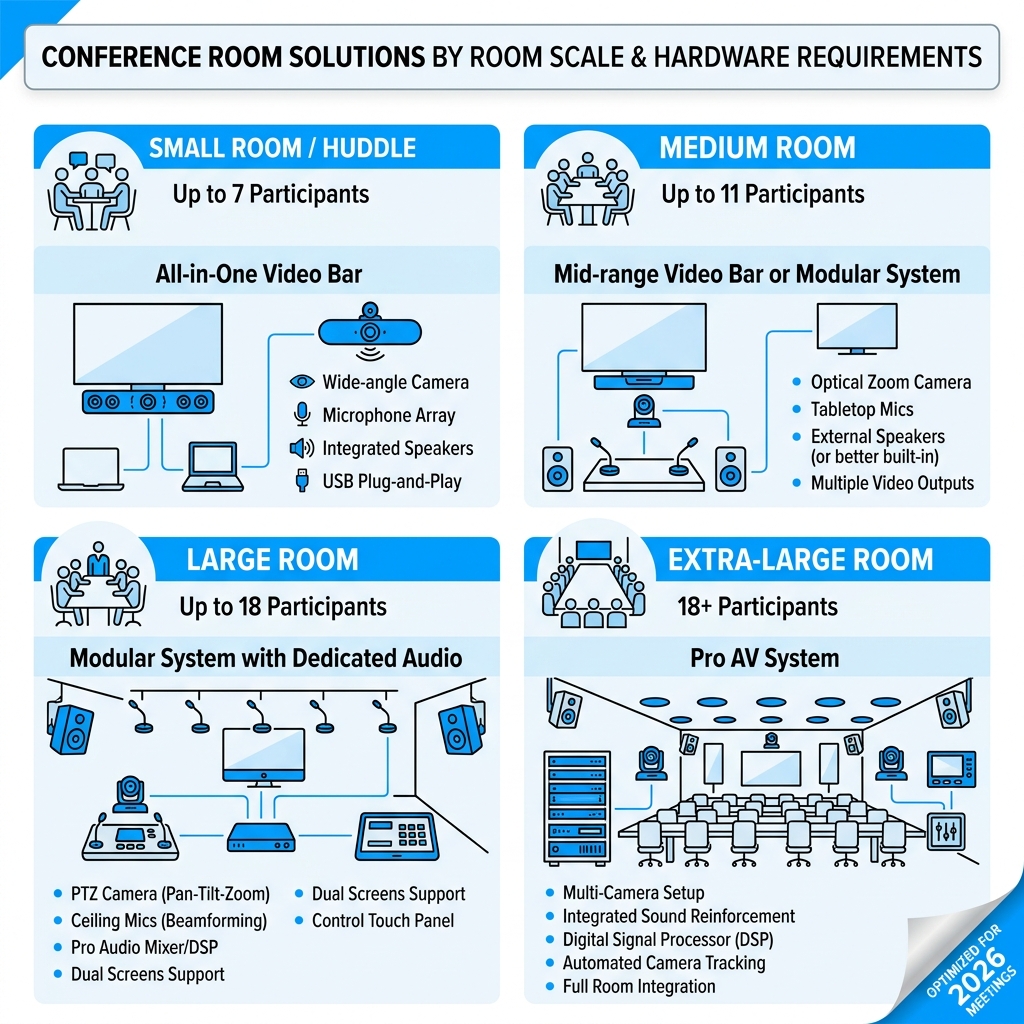
Here’s a quick look at the best options by room size:
| Room Size | Participants | Recommended Solution Type |
|---|---|---|
| Huddle / Small | Up to 7 | All-in-one video bar (e.g., Rally Bar Mini, Meeting Owl 3) |
| Medium | Up to 11 | Mid-range video bar or modular system |
| Large | Up to 18 | Modular system with ceiling mics and dedicated audio |
| Extra-Large | 18+ | Pro AV system (e.g., Nureva HDL410, Biamp Tesira) |
Bad meeting tech is more than just annoying. It breaks focus, wastes time, and quietly signals to clients and staff that you haven’t kept up.
And the problem is getting worse. Hybrid work means every room now needs to perform for both the people in it and the people dialing in. A fuzzy camera or a mic that cuts out doesn’t just frustrate one person — it disconnects half the meeting.
The good news? The market for conference room technology has matured fast. There are now purpose-built solutions for every room size, budget, and platform — from simple plug-and-play video bars to fully managed Pro AV systems with AI-powered speaker tracking and automatic noise cancellation.
This guide cuts through the noise and compares the best options across every category, so you can make a confident, informed choice.
Conference room solutions vocab to learn:
Categorizing Conference Room Solutions by Space Size

When we help businesses in Troy, Birmingham, or Royal Oak set up their offices, the first question we ask isn’t “What brand do you like?” It’s “How big is the table?”
The physical dimensions of your room dictate everything from the field of view (FOV) required for your camera to the number of microphone “pick-up zones” needed to ensure the person at the far end of the table isn’t shouting to be heard. To get a head start on your planning, you can use a Conference Room Design Tool to visualize how different components will fit into your specific floor plan.
Acoustic coverage is another critical factor. In a small room, a single speaker bar might suffice. But as rooms grow, we need to consider spatial audio—the ability for remote participants to hear sound coming from the direction of the person speaking. This creates a much more natural “in-person” feel.
Solutions for Huddle and Small Rooms
Huddle rooms and small meeting spaces (typically seating up to 7 participants) are the backbone of modern collaboration. For these spaces, we often recommend all-in-one “video bars.” These devices combine the camera, microphones, and speakers into a single unit that sits above or below the display.
The Meeting Owl 3 is a fan favorite for small groups because of its 360-degree camera that sits in the center of the table, ensuring every participant is seen equally. If you prefer a wall-mounted approach, the Logitech Rally Bar Mini offers a 163° horizontal field of view, making it perfect for shallow rooms where people sit close to the screen.
For those who need professional-grade optics in a compact form, the Vidi 250 wide angle 4K conferencing camera is an excellent choice. It uses a 12MP sensor to deliver crystal-clear 4K video, ensuring that even in a cramped huddle space, the image remains sharp and undistorted.
Scalable conference room solutions for Large and Extra-Large Spaces
Once you move into boardrooms or training centers in places like Farmington Hills or Livonia, “off-the-shelf” bars often hit their limit. Large rooms (up to 18 people) and extra-large spaces require modular conference room solutions.
For massive spaces, we look at systems like the Nureva HDL410. While a standard system might cover a 25′ x 25′ area, the HDL410 is designed for rooms up to 35′ x 55′. It uses “Microphone Mist” technology to fill the room with thousands of virtual microphones, so a presenter can walk around the entire space without losing audio quality.
If you are designing a high-stakes boardroom, you’ll want to consult a Large Conference Room Design Guide. These guides help us integrate complex systems like Biamp Tesira, which uses networked audio to connect ceiling-mounted microphones and speakers, providing a clean, wire-free look while maintaining “Pro AV” performance.
Essential Features of Modern Video Conferencing Hardware
In the past, a “good” conference camera just meant it didn’t look like a potato. Today, we expect much more. Modern hardware relies on high-end optics, such as 4K Sony sensors, and ultra-wide fields of view to ensure no one is “cut off” at the edge of the frame.
Devices like the Parlé VBC 2800 Conferencing Video Bar lead the pack by combining dual 4K cameras with an integrated 27-microphone array. This isn’t just about pixels; it’s about how the hardware uses that data to improve the meeting.
The Role of AI in Meeting Equity
“Meeting equity” is the idea that remote participants should have the same presence as those in the room. This is where AI becomes your best friend. Modern conference room solutions use AI for:
- Speaker Tracking: Automatically zooming in on the person talking so remote viewers can see facial expressions.
- Auto-Framing: Adjusting the wide-angle view to perfectly fit whoever is currently in the room.
- Noise Cancellation: Using technology like ProperClean 2.0 to filter out the sound of crinkling chip bags or humming HVAC systems.
We highly recommend using conferencing microphones with voice lock-in. These smart mics can actually “track” a voice as a person moves, ensuring the audio level stays consistent whether the speaker is leaning back in their chair or standing at a whiteboard.
Choosing conference room solutions for Hybrid Meeting Equality
To truly bridge the gap between home and office, you need more than just a camera. Interactive whiteboards, like the Vibe Board S1, allow teams to brainstorm on a digital canvas that remote users can see and interact with in real-time.
Audio is the other half of the equity equation. In many Michigan offices, we see beautiful glass-walled rooms that sound like echo chambers. To fix this, we often install Desono C-IC6LP low profile conferencing loudspeakers. These ceiling-mounted speakers are designed specifically for speech reproduction, ensuring that the “far-end” voices sound like they are right there in the room with you.
All-in-One Video Bars vs. Modular Conference Room Solutions
Choosing between an all-in-one bar and a modular system is usually a trade-off between simplicity and flexibility.
| Feature | All-in-One Video Bars | Modular Systems |
|---|---|---|
| Installation | Plug-and-play (30-60 mins) | Complex (Requires professional wiring) |
| Aesthetics | Single unit under the TV | Hidden components, ceiling mics |
| Scalability | Limited to small/medium rooms | Highly scalable for any size |
| Cable Management | Minimal | Requires dedicated hubs/conduits |
For many businesses in Oakland County, all-in-one bars are the “easy button.” However, for a custom-built executive suite in Bloomfield Hills, a modular system allows us to hide the tech and focus on the room’s design. To bridge the gap between these two worlds, we use tools like the EasyConnect MPX 250, which provides a simple connection point for users while keeping the “brains” of the system tucked away.
Benefits of BYOM (Bring Your Own Meeting)
BYOM is a trend we love. Instead of relying on a computer built into the wall, users simply bring their own laptop and plug in a single USB-C cable.
The benefits are clear:
- User Familiarity: You use the laptop you’re comfortable with.
- Platform Agnostic: It doesn’t matter if the meeting is on Zoom, Teams, Webex, or BlueJeans—it just works.
- Cost-Effective: You don’t need to pay for a dedicated “room PC.”
If you’re interested in how this integrates with your broader office tech, you can find more info about commercial AV integration on our site. It’s all about making the technology invisible so you can focus on the work.
Dedicated Room Appliances and Platform Certifications
On the flip side, some companies prefer “Dedicated Room Appliances.” These are systems that are “always on” and run a specific version of Microsoft Teams Rooms or Zoom Rooms.
The main advantage here is the “One-Touch Join” experience. You walk into the room, see your meeting on the touch controller, and tap one button to start. To make this work seamlessly, hardware like the Biamp UC Core and Controller is essential. These certified devices are tested to ensure they won’t crash mid-presentation and offer a consistent user interface across every room in your company.
Maximizing ROI with Scalable and Managed Systems
Investing in conference room solutions isn’t just a one-time purchase; it’s an ongoing part of your IT infrastructure. To get the best Return on Investment (ROI), you need systems that can be managed remotely.
Platforms like Logitech Sync or Nureva Console allow your IT team (or us!) to push firmware updates, check device health, and even adjust camera settings without ever stepping foot in the room. This is a lifesaver for companies with multiple locations across Macomb and Wayne counties. You can see more info about our brand partners and how their management tools help keep your downtime to zero.
Installation Ease and Future-Proofing
We always tell our clients: “Don’t build for today; build for three years from today.” This means using “smart wiring” like Power over Ethernet (PoE), which allows a single cable to provide both data and power to your touch panels and microphones.
Future-proofing also means choosing hardware with a clear upgrade path. For example, the Nureva HDL300 upgrade paths are incredibly smart. If you already own an older HDL300 system, you can often just swap out the “connect module” to get the latest features without having to replace the expensive microphone bars mounted on your walls.
Pricing Tiers and Budgeting for Performance
Budgeting for conference room solutions usually falls into three buckets:
- Entry-Level ($1,000 – $2,500): Great for huddle rooms. Includes all-in-one bars like the Meeting Owl or Rally Bar Mini.
- Mid-Range ($3,000 – $6,000): Ideal for standard conference rooms. Often includes a dedicated touch controller and a more powerful video bar.
- Premium ($8,000+): For boardrooms and extra-large spaces. Includes Pro AV components, ceiling mics, and professional DSPs (Digital Signal Processors).
To simplify the process, many vendors now offer complete room solution bundles. These bundles take the guesswork out of compatibility, ensuring that every cable, mount, and microphone works perfectly together right out of the box.
Frequently Asked Questions about Conference Room Solutions
What is the difference between BYOM and a dedicated room system?
BYOM (Bring Your Own Meeting) relies on a user’s laptop to run the meeting software, using the room’s cameras and mics as peripherals. A dedicated room system (like a Microsoft Teams Room) has its own built-in computer and stays “logged in” to the room’s calendar, allowing for one-touch joins without a laptop.
How does AI noise cancellation improve hybrid meetings?
AI noise cancellation uses machine learning to identify and “subtract” non-human sounds. This means if someone in a Rochester Hills office is typing loudly or a siren goes off outside a window in Detroit, the remote participants will only hear the speaker’s voice, not the distracting background noise.
Which audio solution is best for extra-large conference rooms?
For extra-large rooms (35′ x 55′ or larger), we recommend systems that use “virtual microphone” technology or networked ceiling arrays. The Nureva HDL410 or a Biamp Tesira system with multiple ceiling mics are the gold standards, as they provide uniform coverage regardless of where people are standing or sitting.
Conclusion
At the end of the day, the best conference room solutions are the ones you forget are even there. When the audio is crisp, the video is clear, and the “join” button actually works, your team can stop troubleshooting and start collaborating.
Whether you are outfitting a single huddle room in Oak Park or a multi-floor headquarters in Southfield, we are here to help you achieve “experience equity.” By combining smart hardware with professional integration, we ensure that every meeting is a productive one.
Ready to end your tech headaches? Explore our commercial services or contact us today to design a future-proof collaboration space for your Michigan business. Let’s make your next meeting the easiest one yet.