The Best Wireless and DIY Security Systems Tested and Ranked
The Best Wireless Alarm Systems of 2026, Tested and Ranked
If you’re shopping for the best wireless alarm system, here’s a quick look at the strongest system types available right now:
| System Type | Best For | Starting Equipment Cost | Monthly Monitoring |
|---|---|---|---|
| Professionally integrated wireless alarm system | Premium homes, estates, and light commercial properties | Varies by design | Available |
| DIY wireless alarm kit | Smaller homes, apartments, and simple layouts | Typically lower upfront cost | Optional |
| Smart home integrated alarm system | Security, lighting, access control, and climate automation | Varies by ecosystem | Available |
| Wi-Fi connected alarm hub | App control and basic whole-home alerts | Moderate upfront cost | Optional |
| No-fee local alarm kit | Subscription-free local siren and mobile alerts | Hardware-only cost | None required |
| Entry-level monitored wireless system | Budget-conscious homeowners who still want dispatch support | Lower upfront cost | Available |
There’s a break-in every 26 seconds in the United States. Yet a lot of homeowners are still relying on systems that are either outdated, fragmented across multiple vendors, or installed so quickly that half the sensors don’t actually cover what they’re supposed to.
The wireless security market has exploded. There are now over 10,000 results for wireless home security systems on major retail marketplaces alone. That’s not a shopping experience – that’s a maze.
The difference between a system that actually protects your home and one that just looks like it does comes down to a few key decisions: how the system communicates, whether it stays online when the power goes out, and whether the components actually work together.
This guide cuts through the noise. We tested and ranked the top wireless alarm system categories available in 2026 – from full professional monitoring setups to no-fee DIY kits – so you can make a confident choice without reading 40 product pages.
I’m Dominic Hesano, owner of SmartMait and a low voltage installation specialist with years of hands-on experience helping Southeast Michigan homeowners find the best wireless alarm system for their specific property. Every system type in this list has been evaluated against the same real-world criteria I use when advising clients across Oakland County.
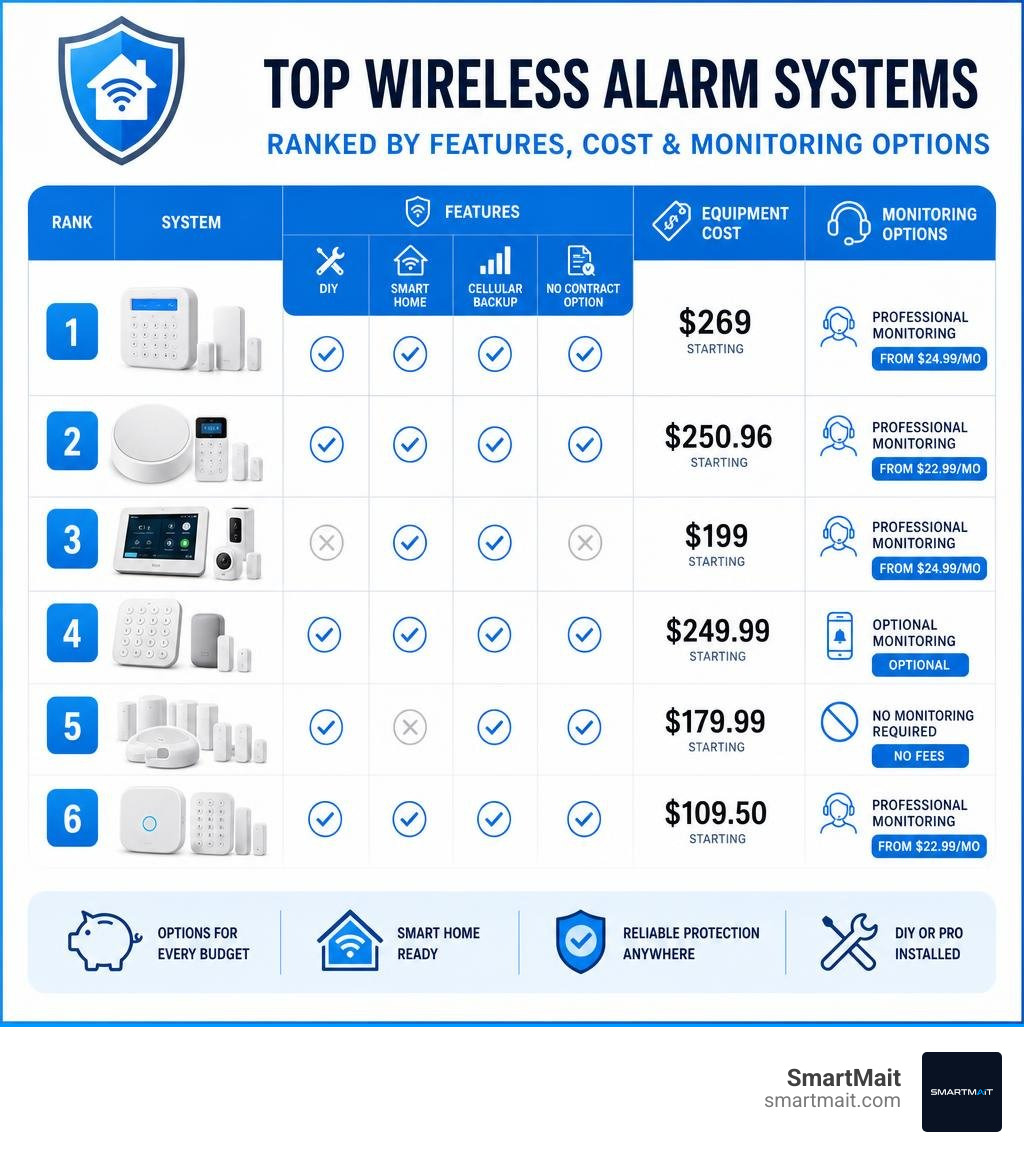
Best wireless alarm system word guide:
What Makes the Best Wireless Alarm System Reliable in 2026?
A common misconception about wireless security systems is that they are inherently less reliable than their hardwired ancestors. While that might have been true a decade ago, today’s Best Wireless Home Security Systems of 2026 utilize advanced communication protocols and redundant power backups that make them incredibly resilient.
To find the best wireless alarm system for your home, you must look past the flashy marketing and focus on three structural pillars: dual-path connectivity, cellular backup, and battery life.

Dual-path connectivity means your system uses two independent communication channels to send signals. Typically, Wi-Fi is the primary path because of its speed and ability to handle high-bandwidth tasks like live camera streaming. However, if your local internet provider drops or a physical line is cut during a break-in, the system must instantly switch to its secondary path: cellular backup.
High-quality panels switch from Wi-Fi to 4G LTE or 5G cellular communication in under two seconds. This seamless transition ensures your alarm panel can still reach the monitoring station even during a total blackout. Understanding these technical baselines is the first step toward securing your home, as detailed in The Definitive Guide to Buying the Best Security Alarms.
Why Z-Wave is Essential for the Best Wireless Alarm System
If you want a system that does more than just make noise when a door opens, you need to look at the underlying wireless standard. Many consumer-grade DIY systems rely purely on standard 2.4 GHz Wi-Fi or Bluetooth. This is a recipe for headaches. The 2.4 GHz band is incredibly crowded, shared by everything from your microwave to your neighbor’s router, which can cause signal drops and slow response times.
The professional standard is Z-Wave Plus. Z-Wave operates on an interference-free 900 MHz radio frequency band, meaning it never competes with your home network. Furthermore, Z-Wave uses mesh networking. Instead of every sensor trying to reach the main base station directly, each plugged-in Z-Wave device acts as a repeater, passing the signal along to extend the system’s range.
By anchoring your security network on a Z-Wave ecosystem, you can seamlessly integrate smart door locks, lighting control, water shutoff valves, and thermostats. This level of cohesion is exactly how you Secure Your Perimeter with Top Alarm Systems and Monitoring while paving the way for a true, architect-grade smart home.
How to Choose the Best Wireless Alarm System for Your Home
When comparing DIY kits, you should evaluate three critical hardware specifications:
- Sensor Range: Look for systems with a sensor-to-hub range of at least 200 to 400 feet. In larger homes in Southeast Michigan suburbs like Bloomfield Hills or Rochester Hills, thick plaster, brick, or multiple floors can degrade signals quickly.
- Encryption Standards: Ensure the system uses encrypted RF signals (such as 128-bit AES encryption). This prevents tech-savvy intruders from intercepting wireless signals or deploying RF jamming devices to bypass your entry sensors.
- Pet Immunity: If you have furry family members, cheap motion sensors will quickly drive you crazy with false alarms. High-end motion detectors use dual-element PIR technology and look for heat signatures above a certain weight threshold (usually 40 to 80 pounds) to ignore roaming pets.
Evaluating these elements beforehand is crucial to finding DIY Home Alarms That Actually Work without constant false alarms or dropped connections.
Comparing Wireless Security System Types: Alarm Kits vs. Camera-Based Systems
As you shop for the best wireless alarm system, you will notice a clear divide: traditional sensor-based kits and camera-first security systems.
| Feature | Traditional Wireless Alarm Kits | Camera-First Wireless Systems |
|---|---|---|
| Primary Detection | Magnetic contact sensors & glassbreak detectors | PIR motion detection & AI video analytics |
| Response Time | Instant (miliseconds from sensor trigger) | Delayed (requires video processing/notifications) |
| Internet Dependency | Low (runs locally, uses cellular backup) | High (requires strong Wi-Fi for video upload) |
| Power Requirements | Multi-year battery life on coin cells | Frequent recharging or solar panel add-ons |
| False Alarm Rate | Very low | Moderate (shadows, wind, or wildlife) |
Understanding this trade-off is vital when learning How to Secure Your Home Without Breaking the Bank. Let’s break down how each type functions in the real world.
Traditional Wireless Alarm Kits
Traditional kits focus on physical perimeter breaches. They protect your home’s actual entry points using magnetic contact sensors on doors and windows, acoustic glassbreak sensors, indoor motion detectors, and keypads.
Professional-grade wireless alarm kits are built on this philosophy. The best systems support a large number of wireless zones, use encrypted sensors, and allow the installer to create separate protection areas for doors, windows, garages, lower levels, detached structures, and light commercial spaces.
Traditional kits excel because they are highly reliable, have incredibly long battery lives (often 2 to 5 years), and trigger instant alarms the moment a physical barrier is crossed. You can learn more about these entry-point options by reading about The Best Door Alarms You Can Buy on Amazon Right Now.
Camera-First Wireless Systems
Camera-first systems prioritize visual surveillance. They use outdoor cameras equipped with Passive Infrared (PIR) motion sensors and artificial intelligence to spot movement before someone touches your door.
These systems are excellent for visual verification and active deterrence – many include built-in spotlights and sirens that trigger when motion is detected. However, cameras require significant bandwidth, and their batteries drain much faster than simple door sensors. A camera-first system is best used as an outer layer of defense rather than your primary alarm network.
Professional Monitoring vs. Self-Monitored Wireless Systems
Once your hardware is installed, you must decide how alerts are handled. Are you going to manage the alarms yourself, or will you pay a monthly fee for a professional monitoring center to watch over your home 24/7? This decision directly impacts your family’s safety, as explored in The Best 24-Hour Home Security Systems for Your Family.
No-Fee Self-Monitoring Options
If you prefer to avoid ongoing contracts, no-fee self-monitoring systems allow you to act as your own dispatcher. With this type of setup, you pay only for the hardware and receive alerts directly through the system’s app.
When a sensor is triggered, the system sends a push notification directly to your phone. Some self-monitored systems also support local sirens, basic snapshot verification, local storage, or a backup battery that keeps the alarm active for a limited period during an outage.
While this is a fantastic way to keep Monthly Alarm System Costs That Won’t Break the Bank, the risk is clear: if you are in a meeting, sleeping, or driving through an area with poor cellular service, you might miss the notification entirely.
24/7 Professional Monitoring Services
For ultimate peace of mind, professional monitoring connects your system to a network of redundant monitoring centers. If an alarm triggers and you don’t disarm it, a trained dispatcher immediately attempts to contact you. If they can’t reach you or if you confirm an emergency, they dispatch local authorities.
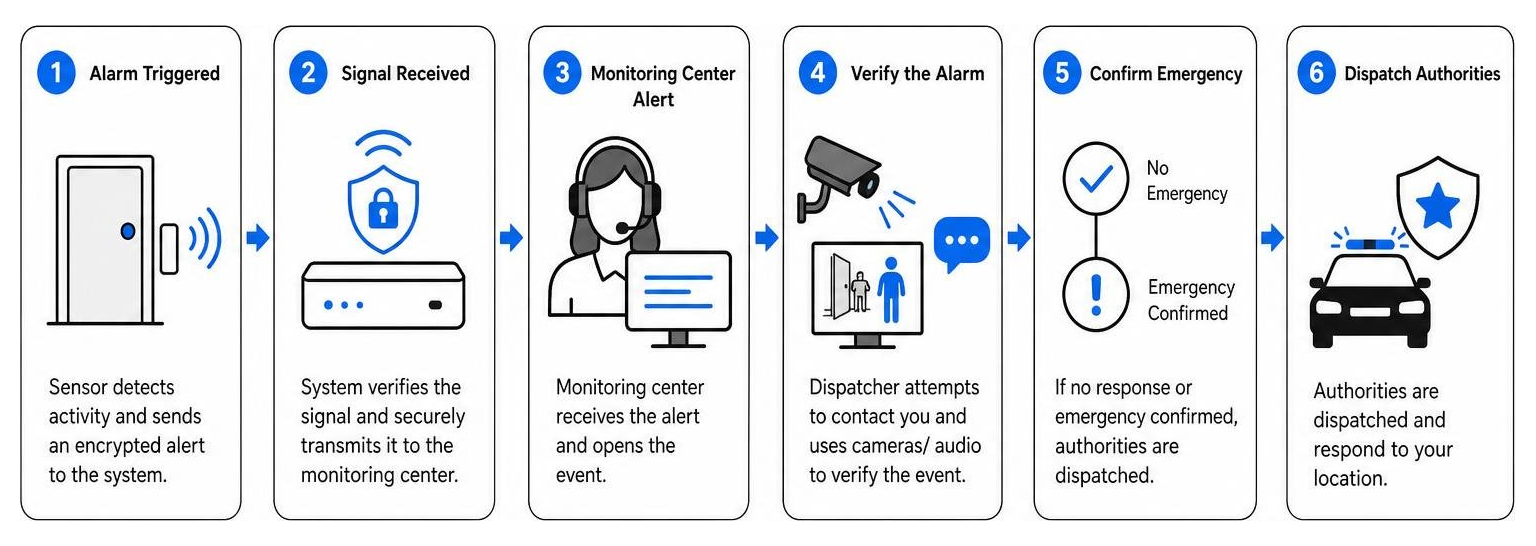
Modern professional monitoring has evolved to include video verification. During an active alarm, properly integrated cameras can help confirm whether the event is a real intrusion, a false alarm, or an environmental issue. Depending on the system design, cameras, sirens, lighting, and two-way audio can also work together to deter criminals before they reach a door or window.
If you are looking for reliable monitoring services in our service areas, you can find the Best Alarm and Monitoring Services to Keep Intruders at Bay to ensure your home remains protected around the clock.
Installation and Maintenance: DIY vs. Professional Integration
The ease of installation is one of the biggest selling points of modern wireless alarms. However, there is a massive difference between slapping peel-and-stick sensors on a few doors and designing a seamless, secure smart home network. Homeowners must carefully weigh Professional Alarm Installation vs DIY What You Need to Know before purchasing equipment.
The DIY Setup Process
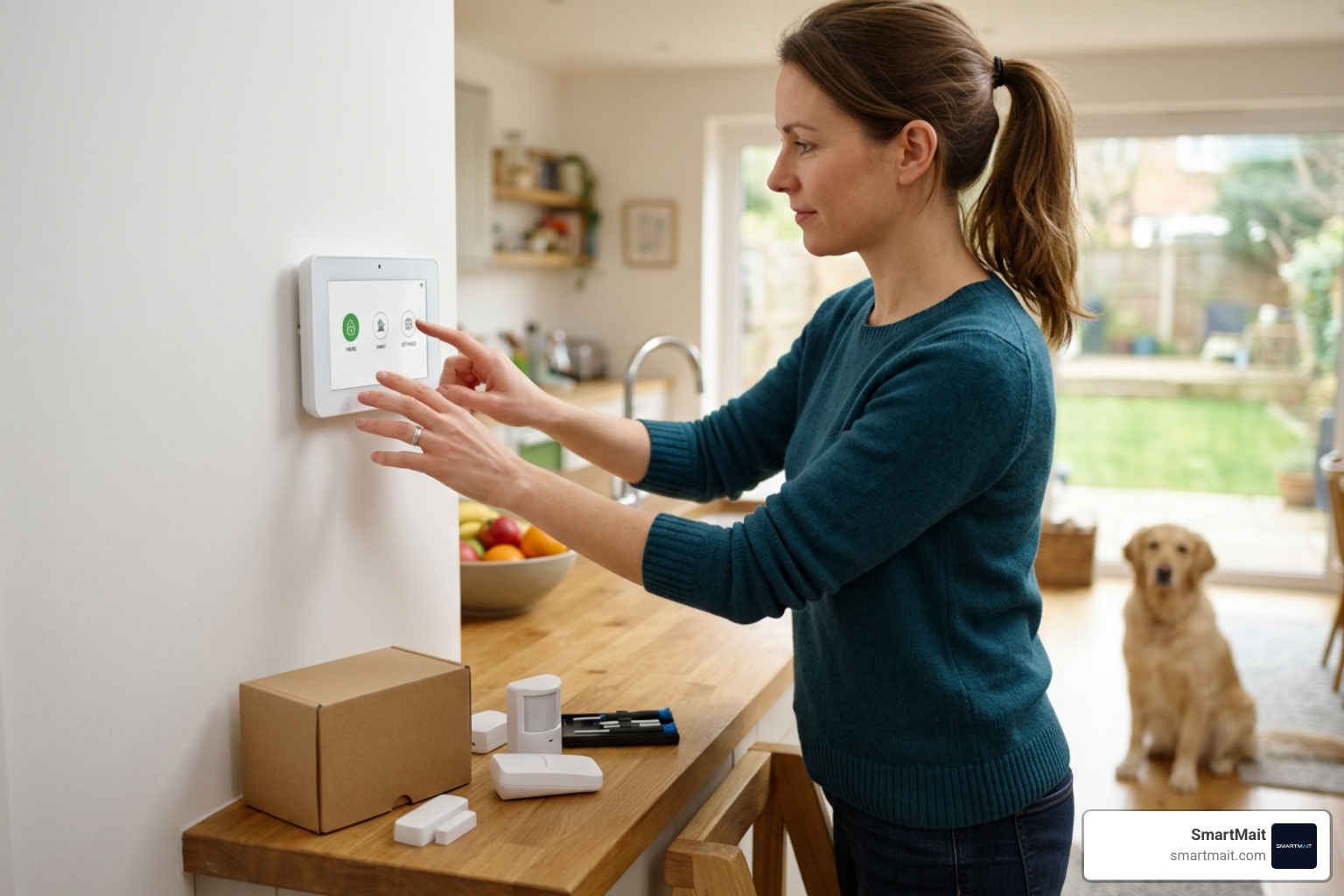
For tech-savvy homeowners living in smaller spaces, setting up a DIY system can be straightforward. Many basic wireless alarm kits are pre-configured to pair with their base stations straight out of the box and are managed through a smartphone app.
A typical DIY setup involves:
- Placing the base station in a central location.
- Using double-sided adhesive foam tape to mount contact sensors on door and window frames.
- Positioning motion sensors in high-traffic corners about six feet off the ground.
- Syncing the devices through a smartphone app.
While this process can take less than 30 minutes, DIY setups often fall short in complex layouts. Users frequently place sensors in dead zones, fail to configure range extenders properly, or leave their home network vulnerable to Wi-Fi drops.
When to Choose Professional Integration
If you own a larger estate, a custom-built home, or a light commercial business in Southeast Michigan’s affluent suburbs – such as Bloomfield Hills, Troy, Birmingham, or Rochester Hills – a basic consumer-grade DIY kit is rarely enough. High-net-worth properties require comprehensive, architect-grade security design.
This is where SmartMait changes the game. We don’t just sell boxes of sensors; we design, install, and maintain fully integrated smart home ecosystems. We ensure your security system is built on a robust Z-Wave backbone, seamlessly tied into your access control, professional Wi-Fi networks, automated lighting, and climate controls.
Furthermore, we solve the biggest pain point of DIY security: long-term maintenance. Through our exclusive SmartService concierge maintenance program, we establish an ongoing relationship with you. We handle battery replacements, sensor testing, firmware updates, and system scaling so you never have to worry about a dead sensor battery compromising your family’s safety.
If you are looking for local expertise, professional integration is the preferred choice for premium homes across Southeast Michigan, ensuring your system is tailored to your property’s exact needs.
Frequently Asked Questions About Wireless Security
Do wireless security systems work during a power outage?
Yes, any high-quality wireless alarm system will continue to protect your home during a power outage. The main hub or control panel contains a rechargeable backup battery that typically provides 12 to 24 hours of local operation. Additionally, if your home Wi-Fi goes down with the power, systems equipped with cellular backup will seamlessly switch to cellular networks to transmit alarm signals to the monitoring center.
Can wireless alarm signals be hacked or jammed?
While cheap, unencrypted wireless systems can theoretically be jammed, professional-grade systems use advanced encryption standards (such as 128-bit or 256-bit AES) and frequency-hopping technology. If an intruder attempts to jam a specific frequency, the system will instantly hop to a clean channel or trigger an automatic “RF Jamming” trouble signal to the monitoring station, alerting dispatchers that something is wrong.
How long do the batteries last in wireless sensors?
Most wireless door and window contact sensors use high-capacity lithium coin-cell batteries that last between 2 and 5 years, as they only draw power when a door opens or closes. Wireless motion detectors and glassbreak sensors typically last 2 to 3 years. Outdoor wireless cameras, which transmit heavy video data, have a much shorter battery life (usually 3 to 6 months) unless paired with a solar panel charger.
Conclusion
Finding the best wireless alarm system doesn’t mean you have to settle for a basic, self-installed plastic hub that drops offline every time your router reboots. While DIY kits offer a quick fix for small apartments, premium homes and businesses require a robust, professional standard.
At SmartMait, we elevate home security into a unified, architect-grade smart home experience. By anchoring our designs on the reliable, interference-resistant Z-Wave ecosystem, we ensure your security, lighting, climate, and access controls work together as one cohesive unit.
Best of all, we don’t install a system and disappear. With our SmartService concierge maintenance program, we provide ongoing, hands-on support to affluent communities across Oakland, Macomb, and Wayne counties.
Ready to secure your home with a system that is professionally designed, integrated, and maintained? Contact us today at SmartMait to schedule your custom home security consultation.