The Manager’s Guide to Modern Attendance Tracking with Access Cards
Track Time and Attendance with Access Cards
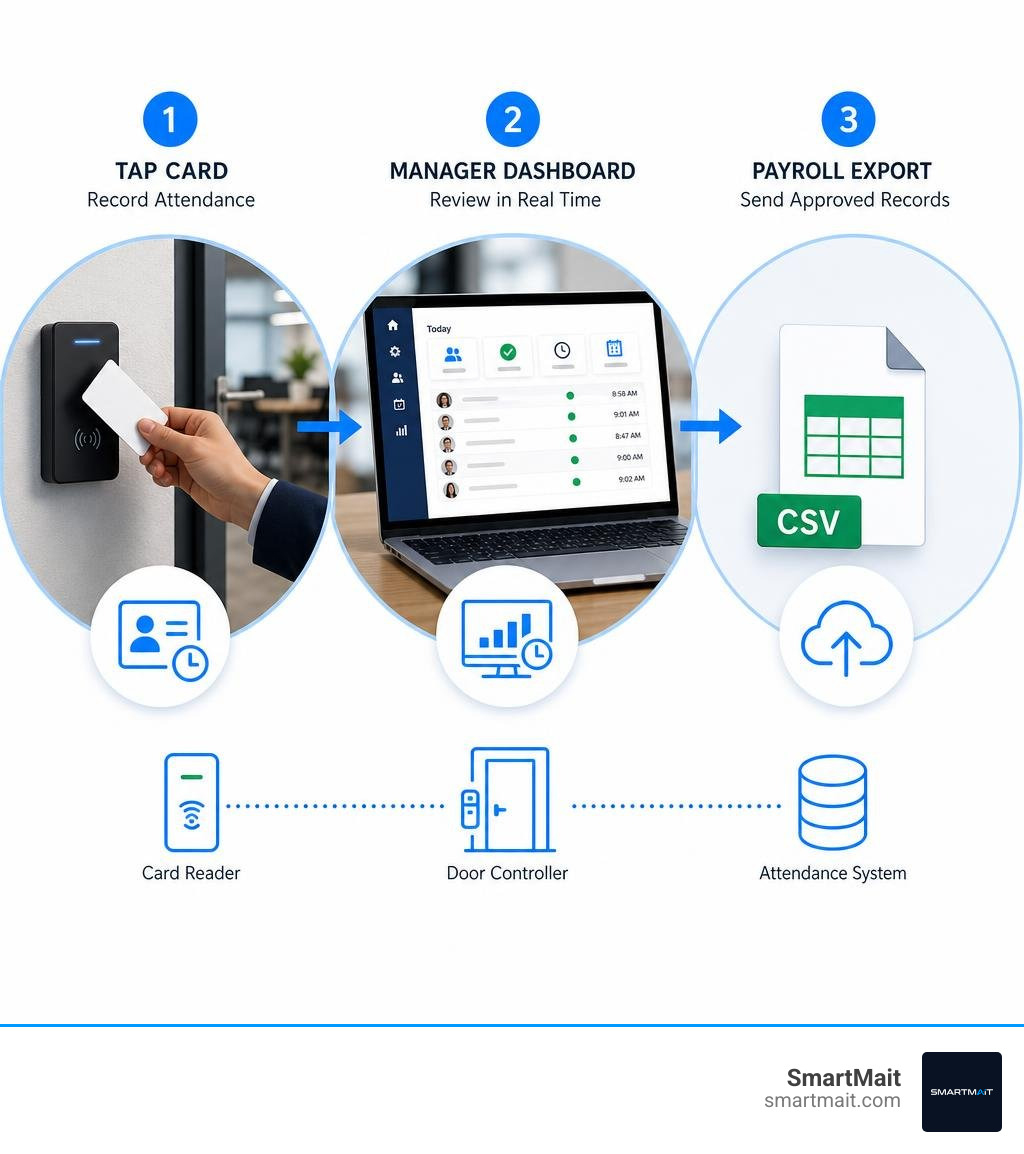
An access card attendance system records when an employee arrives, leaves, or enters a controlled area when they tap a card, fob, or other RFID credential at a reader. To make it useful, connect the reader to a door controller and attendance platform, assign each person a credential, set shift rules, and send approved time records to payroll or HR software.
It replaces paper timesheets, punch clocks, and manual spreadsheet work with timestamped records that managers can review in real time. The same credential can also unlock authorized doors, helping a small business see who accessed a space, when they did it, and whether the attempt was allowed.
For a busy office, medical practice, retail site, or multi-door facility, this means fewer payroll corrections and less time chasing down missing punches. It also creates a clearer audit trail than a shared key or paper sign-in sheet.
I am Dominic Hesano, and I have spent years designing and troubleshooting low-voltage wiring, security, network, and smart-system infrastructure across Southeast Michigan. That hands-on work informs how I approach an access card attendance system: as a dependable, well-wired part of the larger security and network environment, not a standalone device that gets ignored after installation.
Important access card attendance system terms:
How an Access Card Attendance System Works from Tap to Payroll

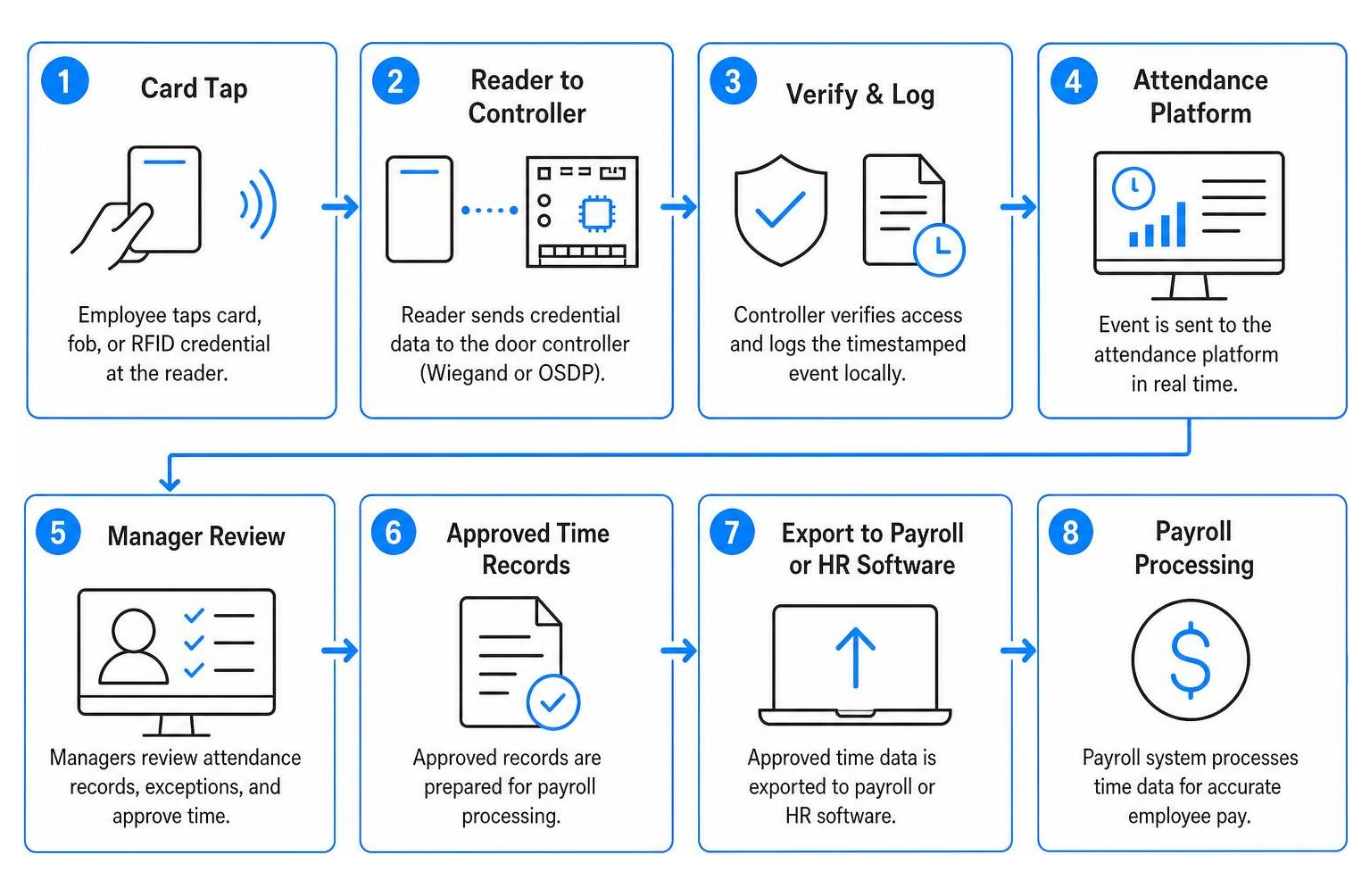
When an employee arrives at the door in the morning, their interaction with the system takes a fraction of a second. Under the hood, however, a tightly orchestrated series of low-voltage and digital events occurs. The moment a credential enters the electromagnetic field generated by the scanner, the chip inside the card powers up and transmits its unique identifier (UID).
Depending on your facility’s setup, the hardware operates at either a 125 kHz low-frequency range or a 13.56 MHz high-frequency range. The scanner captures the encoded payload and transmits that data string back to the local controller using an industry-standard interface like Wiegand or the more secure, bidirectional Open Supervised Device Protocol (OSDP). For developers and tech managers looking at how edge microcontrollers handle these streams, exploring open-source IoT attendance architectures provides great insight into the bare-metal mechanics of card-to-controller handshakes.
Core Hardware Architecture and RFID Reader Components
The backbone of this process is the physical control panel. Modern commercial panels utilize an intelligent access control controller driven by robust 32-bit processors capable of lightning-fast edge processing. This edge capability allows the terminal to evaluate access permissions locally in under 0.1 to 0.3 seconds.
When valid credentials authenticate, optical relays engage physical security hardware—such as electromagnetic locks or electric door strikes—while triggering visual status LEDs and audible feedback buzzers to confirm access to the user. Critical to business continuity, these boards incorporate non-volatile CMOS flash memory that provides up to 10-year data retention without auxiliary power, guaranteeing that critical access logs never vanish during a sudden blackout.
Step-by-Step Data Processing and Cloud Synchronization
Once physical access is authenticated, the digital journey begins. Understanding modern card access technology means looking past the physical lock to the data layer. The controller structures the tap event with a precise, second-accurate timestamp and forwards it across the building’s TCP/IP network using lightweight MQTT messaging protocols or structured REST APIs.
The data lands in your central database, where automated attendance rules take over:
- Clock-In Parsing: The system categorizes the scan as an entry, departure, or intermediate break based on programmed shift patterns.
- Schedule Reconciliation: Raw scan times map against defined working windows, grace periods, and overtime parameters.
- Manager Dashboard Updates: Live web feeds display active headcounts, tardiness alerts, and unexcused absences.
- Payroll Export: At pay-period close, clean data files format automatically for export directly into HR platforms, reducing manual data entry errors by up to 70%.
Comparing Card Technologies and Wearable Form Factors
Selecting the right credential medium is just as critical as choosing your controllers. Different physical operating environments demand specific levels of encryption, reading range, and durability to ensure the hardware aligns with institutional enterprise IT infrastructure standards.
| Credential Type | Operating Frequency | Read Range | Security Level | Best Use Cases |
|---|---|---|---|---|
| Standard Proximity (EM-ID) | 125 kHz | 5 – 10 cm | Basic (Fixed UID) | Low-risk offices, small interior doors |
| Smart Card (MIFARE / DESFire) | 13.56 MHz | 2 – 10 cm | High (Encrypted Sectors) | Multi-tenant commercial, financial, municipal |
| RFID Key Fobs | 125 kHz / 13.56 MHz | 2 – 5 cm | Medium to High | Warehouses, fleet yards, quick ring storage |
| Silicone Wristbands | 13.56 MHz / NFC | 1 – 4 cm | Medium | Fitness centers, spas, water-exposed sites |
| Textile Laundry Tags | UHF / 13.56 MHz | 10 cm – 2 m | Industrial High | Hospitality uniform closets, medical scrubs |
High-Frequency MIFARE vs. Low-Frequency Proximity Cards
Legacy 125 kHz EM-ID proximity cards transmit their unencrypted serial number openly. While inexpensive and functional for simple perimeter entry, they remain vulnerable to basic handheld cloning tools.
For facilities requiring serious security, 13.56 MHz MIFARE smart cards compliant with ISO/IEC standards provide dedicated EEPROM memory with cryptographic sector protection. When evaluating key card access systems, dual-frequency readers represent a smart stepping stone. They read legacy 125 kHz badges and modern 13.56 MHz encrypted cards simultaneously, letting organizations migrate their credential inventory gradually without breaking the operational bank.
Integrating an Access Card Attendance System Across Non-Card Form Factors
Not every role is well-suited to a PVC badge hanging from a lanyard. Light commercial setups often see massive efficiency boosts by deploying specialized wearable form factors:
- Silicone Wristbands: Ideal for fitness facilities, hospitality staff, or pool managers where pockets are non-existent and water resistance is essential.
- Durable Key Fobs: Excellent for maintenance teams, fleet drivers, and machine operators who need credentials secured directly on their utility key rings.
- Washable Textile Tags: Industrial laundry tags embedded into uniform lapels or cuffs allow staff in commercial kitchens, hotels, or clinics to clock in naturally as they change into their work attire.
Key Benefits and Security Advantages for Growing Facilities
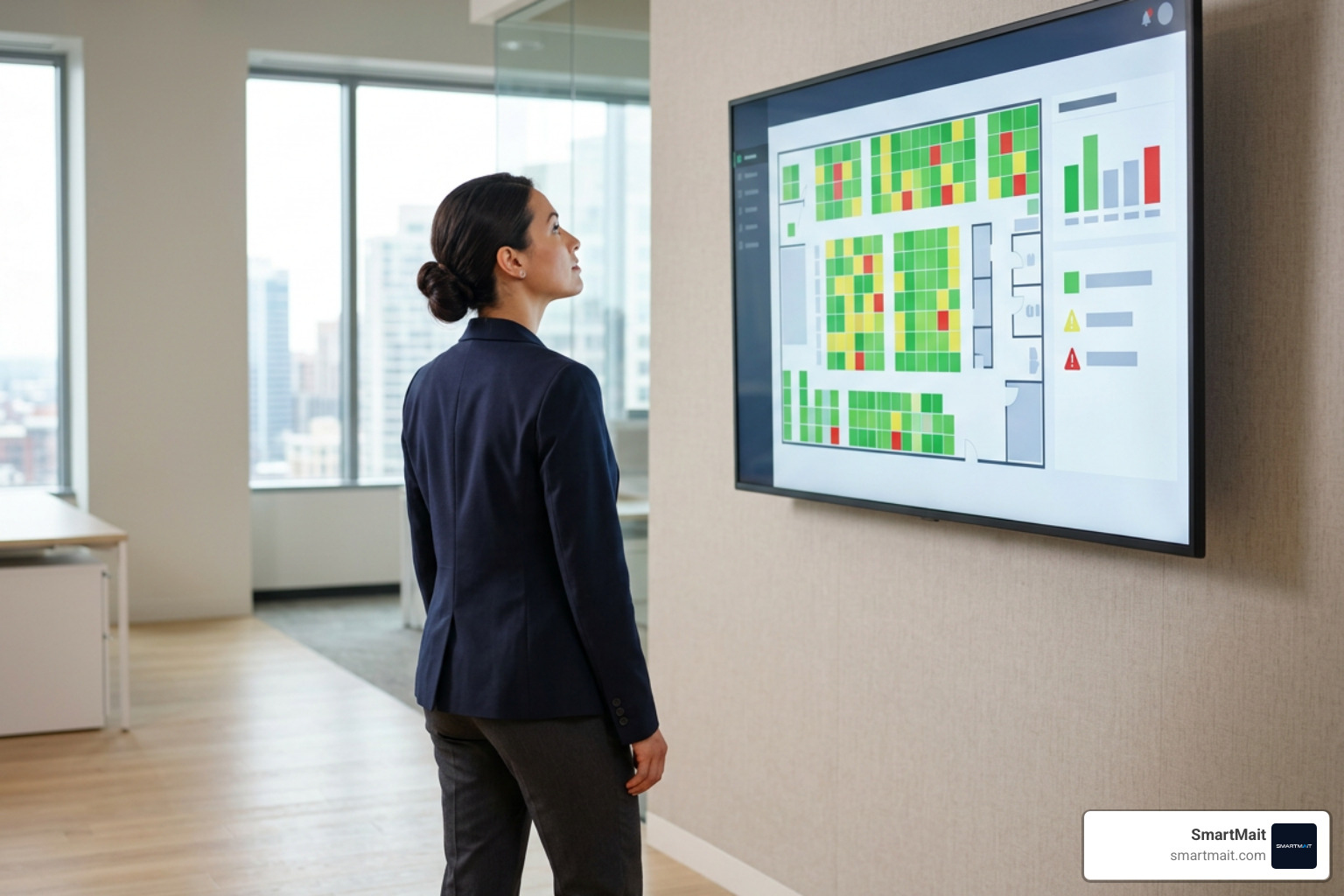
Upgrading to an automated access framework yields major operational returns. Beyond saving hours of administrative overhead, it introduces accountability across every zone in your facility.
Eliminating Buddy-Punching and Manual Log Errors
Traditional paper logs and standalone badge racks make “buddy-punching”—clocking in for a late coworker—trivially easy. Combining access control with time tracking curbs this behavior because the badge that logs attendance is the same credential required to navigate internal turnstiles, parking gates, and office doors. When coupled with hybrid setups like dual-factor authentication terminals, timecard manipulation drops dramatically, protecting payroll margins across every pay period.
Hardening Entry Security with UID Authentication and Intrusion Alerts
A card swipe is more than a simple timestamp; it acts as a primary security checkpoint. Modern controllers authenticate every 64-bit UID against strict access permission schedules. Administrators can reference firmware-level intrusion logging systems to see how modern controllers detect consecutive unauthorized scan attempts and trigger localized alarms.
Advanced controllers support:
- Time-Restricted Permissions: Denying off-shift personnel entry outside designated work hours while flagging the scan attempt in audit logs.
- Tamper and Intrusion Alarms: Sounding local buzzers and dispatching silent notifications if an unauthorized card is presented multiple times within a short window.
- Duress Codes and Super Passwords: Allowing emergency lockouts or alerting security teams silently if an employee is coerced at an access point.
Deployment Best Practices and Multi-Door Network Management
Building a dependable commercial access infrastructure requires attention to clean wiring, proper network planning, and continuous hardware maintenance.
Network Topology, Offline Storage, and Power Redundancy
A resilient architecture mixes structured IP connectivity with rugged industrial field buses. Multi-door controllers frequently employ an RS-485 serial communication bus to connect readers across distances up to 1,200 meters from the central panel, while linking to the local management server via TCP/IP.
Controllers equipped to store 30,000 cardholders and cache up to 80,000 to 100,000 event records locally ensure that daily operations never halt during an internet disruption. When power or data connections drop, the local panel continues verifying credentials and buffering timestamps. As soon as the connection restores, the controller syncs the buffered logs to the cloud database without losing a single punch.
Maintaining Your Access Card Attendance System and Reader Hardware
Even enterprise-grade hardware can run into performance hiccups without regular upkeep:
- Radio-Frequency Isolation: Never mount high-frequency RFID scanners directly onto unshielded metallic surfaces or directly behind another reader on the opposite side of a wall. The metal chassis can absorb electromagnetic fields and degrade scanning range from 10 cm down to zero.
- Voltage Drop Management: Always verify that line runs maintain correct DC operating voltage at the reader terminal, as low voltage directly impedes transceiver power.
- Database Hygiene: Regularly purge inactive contractor accounts, cycle administrator credentials, and maintain clear backups of your user databases.
Frequently Asked Questions About Access Card Attendance Systems
How does an access card attendance system handle network outages?
The reader and door controller rely on onboard non-volatile memory and local credential databases. If the network goes offline, the controller authenticates cardholders locally, operates the physical lock, and stores up to 100,000 timestamped events. Once network connectivity returns, the buffer automatically synchronizes with the main attendance database.
What is the difference between RFID proximity cards and biometric time clocks?
RFID systems deliver rapid, sub-second throughput speeds, lower replacement costs per user, and high reliability in environments where dust, grease, or moisture can interfere with optical fingerprint readers. They also completely bypass biometric data privacy compliance requirements, while serving a dual purpose as printed visual photo-ID badges.
How can managers troubleshoot RFID card detection and reader range issues?
First, check for external electromagnetic interference or metallic backplates causing RF dampening. Second, measure the power supply with a multimeter to ensure there are no line-loss voltage drops below the reader’s required operational thresholds. Finally, test whether the issue is isolated to a physically damaged or demagnetized credential by scanning a known-good master card.
Conclusion
Managing modern facility security and employee attendance does not require juggling disjointed punch clocks, physical keys, and manual timesheets. Upgrading to a modern, interconnected access architecture gives business owners accurate time tracking, ironclad perimeter control, and immediate operational oversight.
At SmartMait, we design, install, and support seamless low-voltage infrastructure, Z-Wave automation, structured networks, and access systems for high-performance properties and commercial spaces across Oakland, Macomb, and Wayne counties. From Rochester Hills and Birmingham to Troy and Farmington Hills, we provide turnkey installations paired with our dedicated SmartService concierge maintenance program to keep your facility secure and dependable day after day.
Ready to bring modern access control and automated time tracking to your workplace? Explore our commercial access control installation and managed services to build a modern infrastructure solution tailored to your team.