Top Rated Wireless Cameras for Easy DIY Installation
How to Choose the Best Wireless Security Cameras for Easy DIY Setup
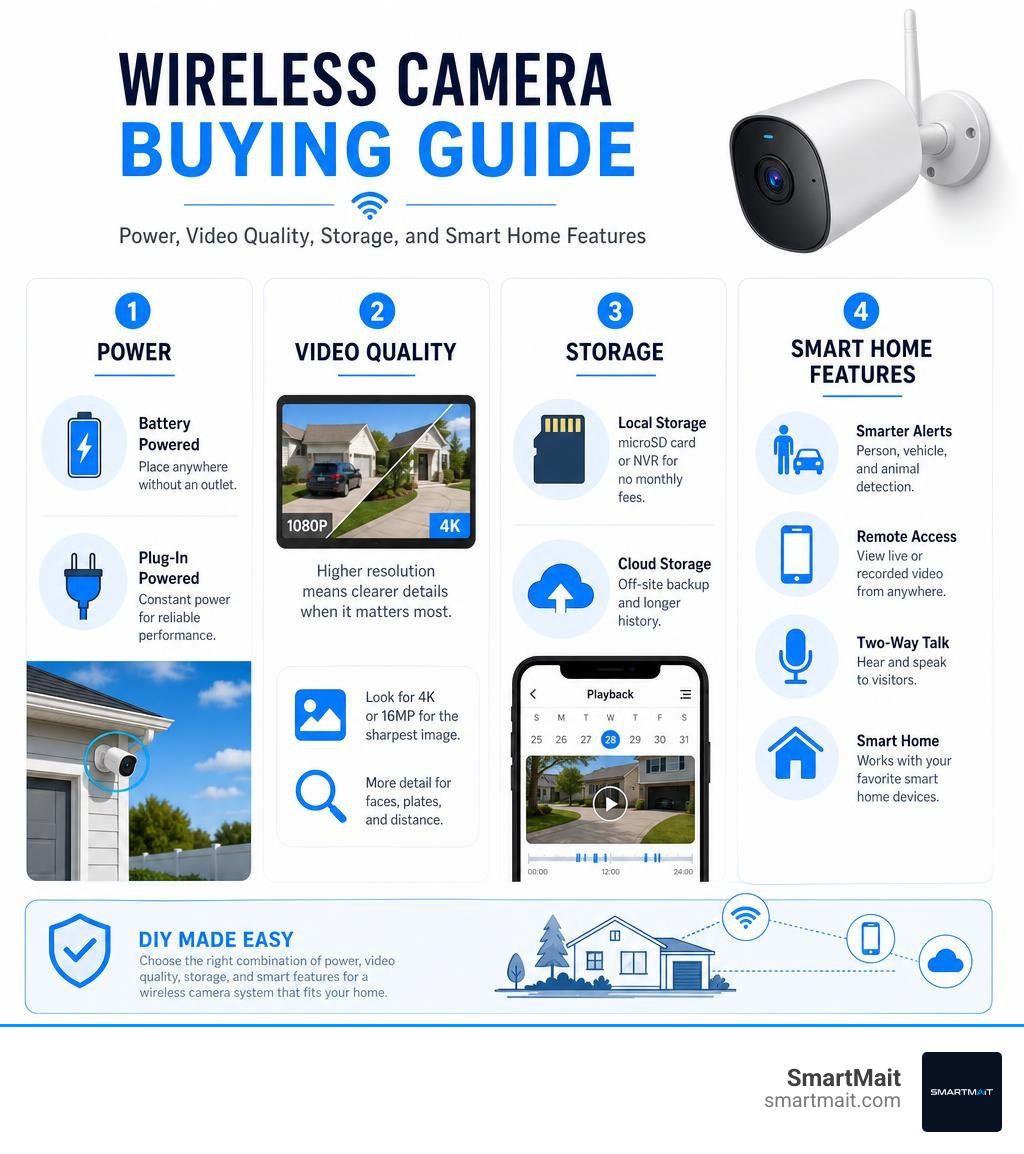
The best wireless security cameras for most homes combine clear video, reliable Wi-Fi, flexible power, and storage that fits your privacy preferences. For an easy DIY setup, start by matching the camera to the job:
- Battery-powered cameras work well where there is no outlet, such as a gate, detached garage, or side yard.
- Plug-in Wi-Fi cameras are better for busy areas that need steady power and may benefit from continuous recording.
- 4K or 16MP cameras offer the strongest detail for driveways and large yards.
- Local microSD or NVR storage can avoid monthly fees, while cloud plans add off-site backup and longer video history.
- AI person, vehicle, and animal alerts help reduce pointless notifications.
“Wireless” usually means the camera sends video over Wi-Fi. It does not always mean wire-free: some models still need a power cable. Battery cameras commonly run about three to six months per charge, although motion activity, cold Michigan winters, and live viewing can shorten that window. Solar accessories or direct power can reduce the need for recharging.
I am Dominic Hesano, founder of SmartMait, and I have spent years installing security, Wi-Fi, and low-voltage systems across Southeast Michigan. In this guide to the best wireless security cameras, I will focus on the models and features that make sense for dependable DIY coverage – and where a professional network and camera plan can prevent the frustrating problems that show up after installation.
Important best wireless security cameras terms:
Top Picks: The Best Wireless Security Cameras of 2026
Modern wireless surveillance has come a long way from grainy footage and sluggish video feeds. Today, property owners can choose from high-resolution systems with multi-lens tracking, built-in solar charging, and localized artificial intelligence that can distinguish between a wandering deer and an unexpected visitor. Finding comprehensive security camera options across various budgets means balancing hardware costs (which typically range from $125 to $450 per unit) against feature sets, storage requirements, and ease of installation.
| Camera Model | Resolution | Power Source | Storage Options | Key Strengths |
|---|---|---|---|---|
| Nest Cam (Battery) | 1080p HDR | Rechargeable Battery / Wired Cable | Cloud (3-hr free, Nest Aware) | On-device AI, Google Home integration |
| Reolink Duo 3 WiFi | 16MP Panoramic (Dual Lens) | Plug-in AC (12V DC) | MicroSD (up to 512GB), NVR, NAS | 180° view, Wi-Fi 6, zero monthly fees |
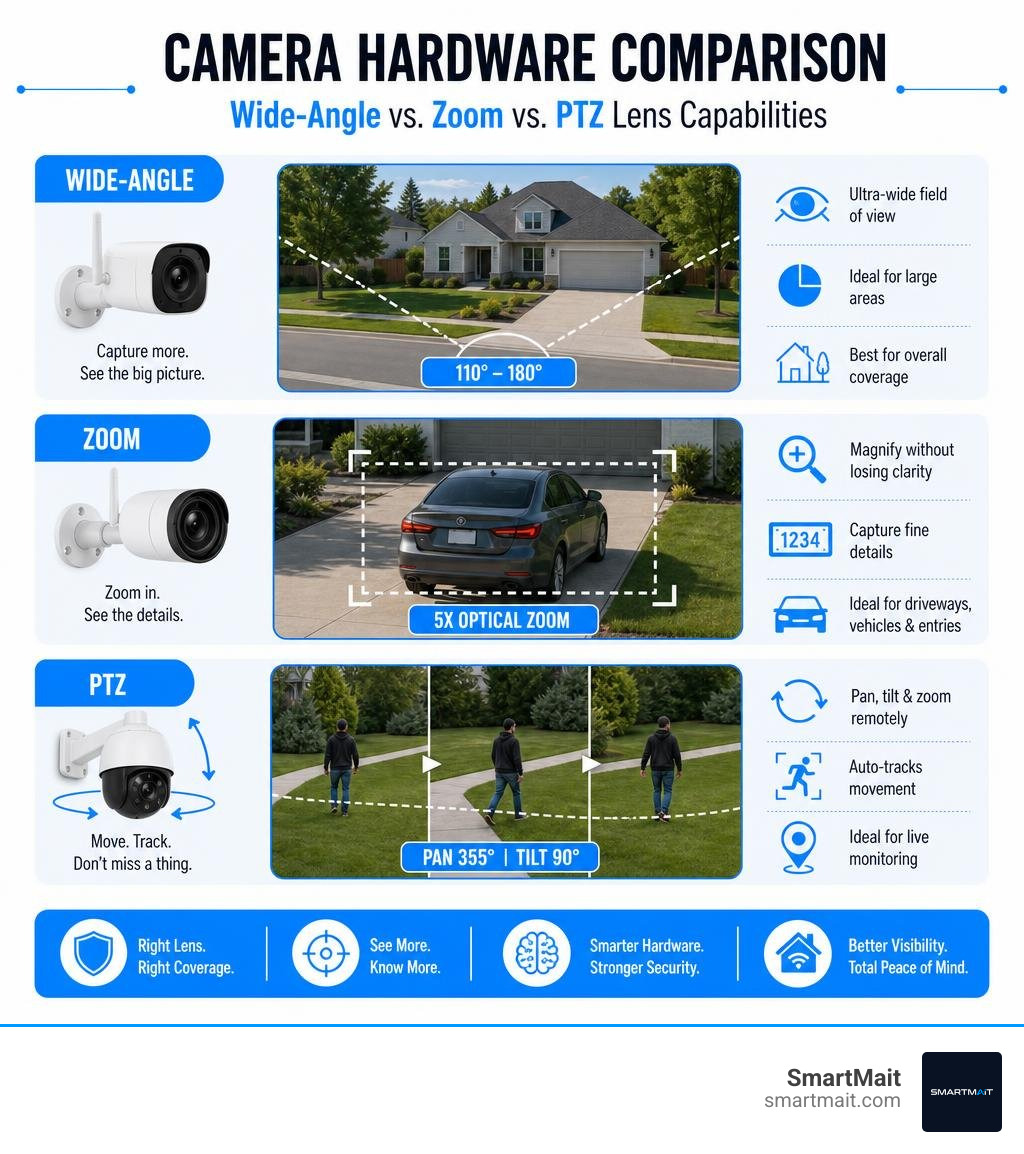
| Reolink W430 | 4K 8MP Ultra HD | Plug-in AC (12V DC) | MicroSD (up to 256GB), NVR, FTP | 5X optical zoom, Wi-Fi 6, spotlight |
| eufyCam S4 | 4K Bullet + 2K PTZ Hybrid | Quick-Swap Battery / Solar / Wired | MicroSD, HomeBase S380 (up to 16TB) | Bullet-to-PTZ tracking, SolarPlus 2.0 |
Nest Cam (Battery): Best for AI Alerts and Versatility
The Nest Cam (Battery) for Indoor or Outdoor remains one of the most adaptable devices for quick DIY deployment. Its weather-resistant enclosure and magnetic mounting base allow homeowners to place it almost anywhere in minutes, whether watching an indoor entryway or monitoring a driveway in Bloomfield Hills.
What elevates this model is its built-in machine learning. The camera processes events directly on the device, accurately categorizing motion into people, animals, and vehicles. It provides 3 hours of rolling event video history straight out of the box without requiring a subscription. For extended retention, upgrading to Google Home Premium unlocks up to 60 days of event clip history, familiar face recognition, and Gemini-powered smart searches.
Reolink Duo 3 WiFi: Best Ultra-Wide Panoramic 16MP Video
For wide perimeters, blind spots along fence lines, or commercial storefronts, single-lens cameras often leave large gaps. The Reolink Duo 3 WiFi 16MP Panoramic Camera solves this by combining dual image sensors into a seamless 180° panoramic stream at 7680×2160 resolution.
Running on modern Wi-Fi 6 (dual-band 2.4/5 GHz) with WPA3 encryption, the Duo 3 streams ultra-high-definition video with minimal latency. It includes advanced perimeter protection that alerts you when someone crosses custom virtual boundaries or loiters in restricted zones. Local recording is supported via onboard microSD cards up to 512GB or direct connection to a dedicated Network Video Recorder (NVR), eliminating recurring cloud fees entirely.
Reolink W430: Best 4K Optical Zoom and Wi-Fi 6 Performance
When identifying license plates or capturing crisp facial details from a distance is a priority, digital zoom falls short. The Reolink W430 4K 8MP Wi-Fi 6 Camera features a true 5X motorized optical zoom that lets you narrow your field of view from 123° down to 39° without losing clarity.
Equipped with an IP67 weatherproof housing, the W430 withstands heavy snow, rain, and extreme temperature swings. Integrated motion-activated spotlights provide vivid full-color night vision, making it one of the top expert recommended outdoor cameras for 2026. Dual-band Wi-Fi 6 ensures that transmitting 4K data streams will not congest the rest of your home network.
eufyCam S4: Best Solar-Powered Hybrid Tracking
The eufyCam S4 Hybrid Security Camera merges two distinct camera designs into a single unit: a fixed 4K wide-angle bullet lens and an agile 2K pan-tilt-zoom (PTZ) lens. When the wide-angle lens detects activity anywhere in its field of view, the PTZ module automatically pivots, zooms in, and tracks the subject across the property up to 164 feet away.
Powered by an integrated SolarPlus 2.0 solar panel, the S4 requires as little as one hour of direct sunlight per day to maintain continuous operation. When paired with eufy’s HomeBase S380, the system leverages local BionicMind AI for facial recognition and allows storage expansion up to 16TB using standard hard drives, giving you complete local control over your video footage.
Wireless vs Wired Cameras: Power, Installation, and Connectivity
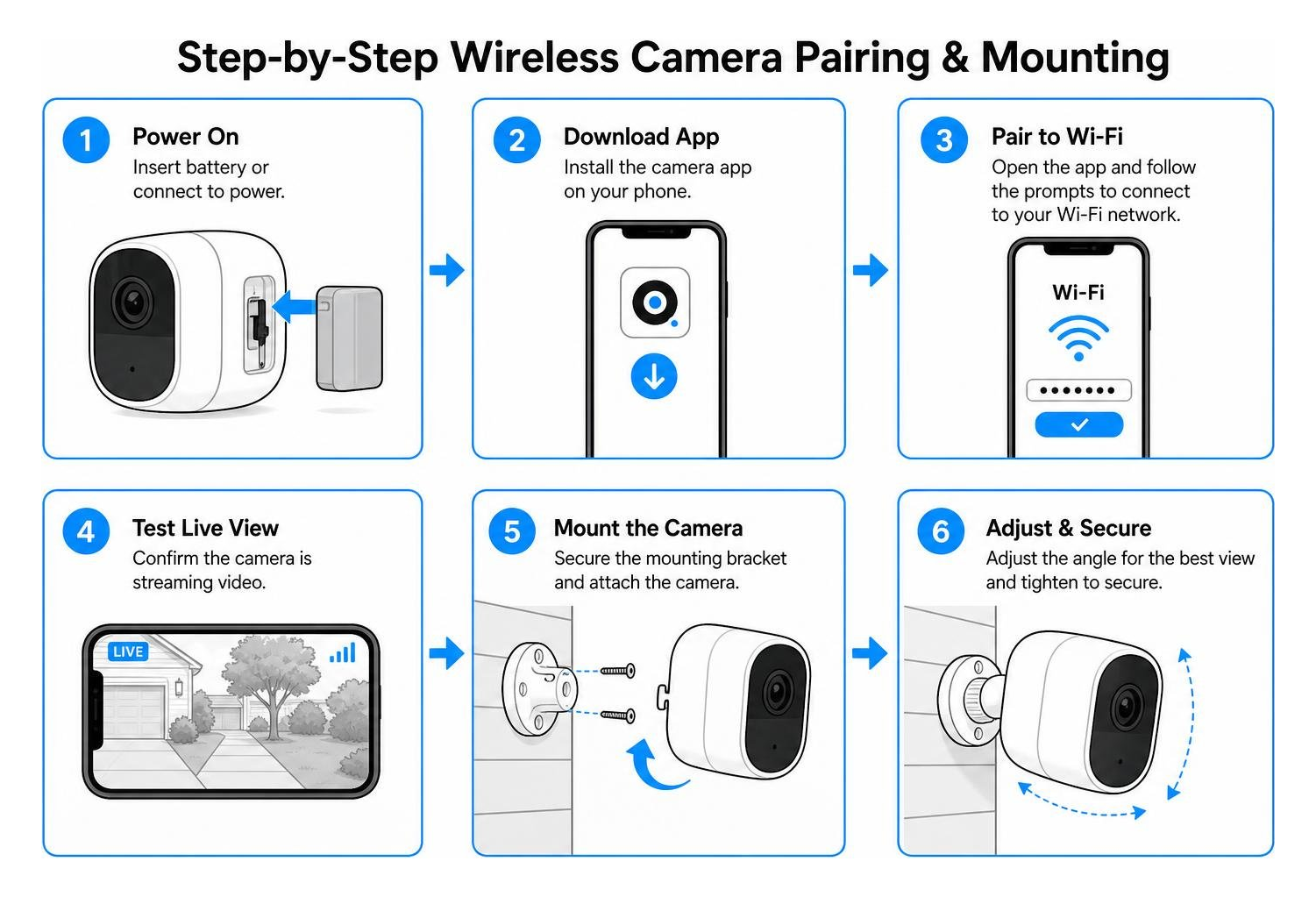
Understanding how modern surveillance systems receive power and transmit data makes handling outdoor security camera installation straightforward. While consumer marketing often uses “wireless” as a broad term, the difference between battery-operated units and plug-in Wi-Fi hardware dictates how you maintain your system over time.
Recent industry analysis from a Consumer Reports review of top wireless security systems reinforces that while wire-free units offer unmatched installation speed, hardwired Wi-Fi cameras provide stability for 24/7 continuous recording.
Battery-Powered Wire-Free vs Plug-In Wireless Models
Wire-free cameras eliminate the need to run electrical wiring through exterior walls. They rely on internal lithium-ion batteries that typically last three to six months between charges under normal residential use. However, frequent motion events, cold climates, and active live-viewing will drain batteries faster. Quick-swap battery packs and small companion solar panels mounted on sunlit rooflines or gutters can provide near-infinite runtime without manual intervention.
Plug-in wireless models, by contrast, connect to a standard electrical outlet while using Wi-Fi for video transmission. Because power is continuous, these cameras support constant 24/7 video recording, higher frame rates, and always-on smart features without entering power-saving sleep modes.
Wi-Fi 6, Dual-Band Frequency, and Off-Grid Cellular Backup
The reliability of any wireless camera depends entirely on the stability of your local network. Selecting and optimizing security cameras for home Wi-Fi networks ensures crisp streams and eliminates buffering:
- 2.4 GHz Band: Offers longer physical range and penetrates walls effectively, making it ideal for cameras mounted on distant gates or outbuildings.
- 5 GHz Band: Delivers significantly higher data throughput with lower latency, which is essential for smooth 4K video feeds close to the access point.
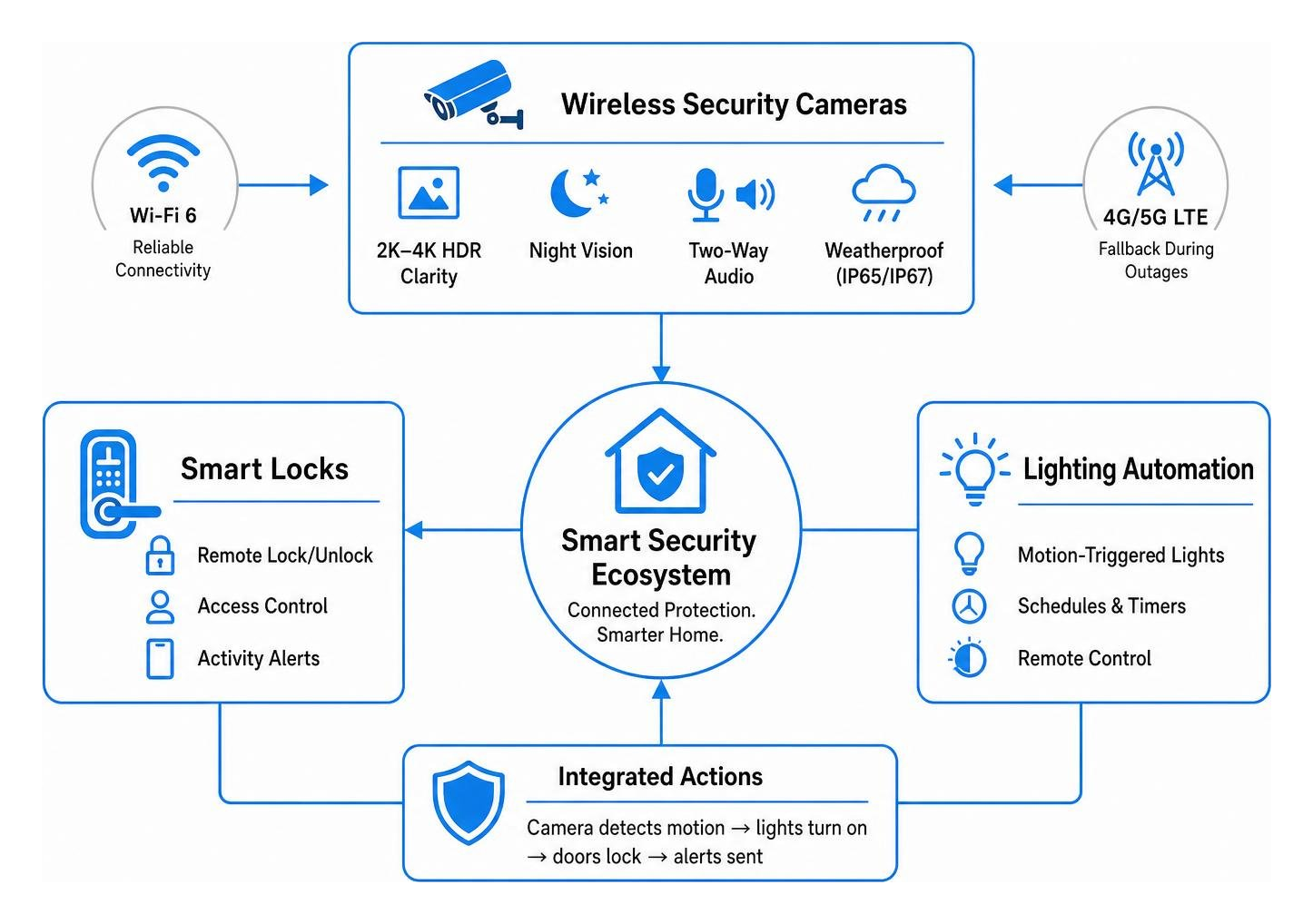
- Wi-Fi 6 (802.11ax): Handles multiple active connected devices simultaneously without choking your home bandwidth, while utilizing modern WPA3 encryption for enhanced network privacy.
- Cellular (4G/5G LTE) Fallback: Specialized off-grid cameras support SIM cards, keeping remote cabins, detached job sites, or perimeter gates protected even during broadband outages.
Critical Features to Consider Before You Buy
Choosing the right equipment requires matching camera specifications to your property layout. When building a complete home security camera setup, look for features that deliver actionable evidence rather than just motion alerts.
Key Features Found in the Best Wireless Security Cameras
- High Optical Resolution & HDR: Aim for at least 2K (1440p) to 4K (8MP) resolution. High Dynamic Range (HDR) balances scenes with harsh shadows and bright sunlight to preserve facial clarity.
- Night Vision Technologies: Traditional infrared (IR) LEDs illuminate up to 100 feet in complete darkness with black-and-white footage. Motion-activated spotlights provide full-color night vision to help identify vehicle colors and clothing.
- Two-Way Audio: Built-in noise-canceling microphones and speakers allow you to communicate with visitors or warn off trespassers in real time.
- Robust Weatherproofing: Look for an IP65 or IP67 ingress protection rating to ensure full resistance against rain, dust, ice, and heavy snow.
Local Storage vs Cloud Subscriptions and Privacy Controls
Managing video retention is an important long-term choice. Many homeowners seek wireless indoor security cameras without subscription fees to maintain complete privacy and avoid recurring costs:
- Local On-Device Storage: MicroSD cards (supporting 128GB to 512GB) or central network recorders (NVRs) store footage locally inside your home behind your own firewall. There are no monthly fees, and your data remains private.
- Cloud Subscription Plans: Platforms like Google Nest Aware, Lorex Cloud (starting around $5.99/month for single cameras), or Arlo Secure upload encrypted clips to remote servers. This safeguards evidence even if the physical camera is stolen or damaged, and provides extended retention from 30 to 60 days.
- Privacy Features: Premium cameras offer customizable activity masking zones to block private areas (like neighboring windows) and scheduled sleep modes that physically or digitally disable indoor cameras when you are home.
Smart Home and Ecosystem Integration
A standalone camera app provides basic notifications, but linking cameras into a broader smart home platform provides real security value. Leading wireless cameras integrate with Amazon Alexa and Google Assistant, allowing you to cast live video directly to smart displays.
For comprehensive security, professional platforms utilize Z-Wave wireless protocols to link perimeter cameras with smart door locks, automated lighting, and entryway sensors. When integrated, a camera detecting motion along a driveway can trigger outdoor floodlights and lock exterior deadbolts automatically, creating an active deterrence network across your entire property.
Frequently Asked Questions About Wireless Security Cameras
Do the best wireless security cameras require a monthly subscription?
No, a monthly subscription is not required for many top models. Brands like Reolink and eufy include full motion detection, two-way audio, and local storage (via microSD cards or centralized hub drives) with no recurring fees. Subscriptions are optional and primarily add off-site cloud backup, extended video history, and specialized cloud AI tools.
How long do wireless security camera batteries typically last?
Most wire-free cameras operate between three and six months on a single charge. Battery drain depends heavily on daily trigger volume, live-stream usage, environmental temperature, and Wi-Fi signal strength. In cold winter conditions, batteries drain more quickly. Adding an optional solar charging panel or using quick-swap spare batteries keeps downtime to a minimum.
Do wireless cameras work without an active Wi-Fi connection?
Standard Wi-Fi cameras require an active local network to send push alerts and stream live video to your smartphone. However, many models with onboard microSD cards will continue recording motion events locally even if the internet drops out. For properties without broadband, dedicated 4G LTE cellular security cameras provide fully standalone operation.
Conclusion
Installing modern wireless security cameras is one of the most effective, accessible ways to monitor your property. With clear 4K video feeds, intelligent AI alerts, and flexible storage options, today’s DIY systems offer reliable visibility for homes, outbuildings, and small commercial spaces alike.
While standalone wireless cameras handle everyday monitoring well, larger properties, multi-building layouts, and complex networks often require a more robust approach. Ensuring reliable Wi-Fi coverage across every corner, integrating cameras with smart lighting and access control, and keeping hardware maintained takes thoughtful planning.
At SmartMait, we specialize in designing and installing unified smart home automation, high-performance structured Wi-Fi, and Z-Wave security architectures throughout Oakland, Macomb, and Wayne counties. Through our dedicated SmartService concierge maintenance program, we provide ongoing support, regular system optimizations, and hands-on care so your property remains safe and connected year-round. Explore our complete range of SmartMait smart home security solutions to build an integrated surveillance and automation system tailored to your home.