Why Every Building Needs a Door Entry Keypad
The Case for Replacing Your Keys With a Door Entry Keypad
A door entry keypad is one of the simplest upgrades you can make to a home or business — and one of the most impactful. No more lost keys. No more wondering who still has a copy. Just a code, a fingerprint, or a tap on your phone.
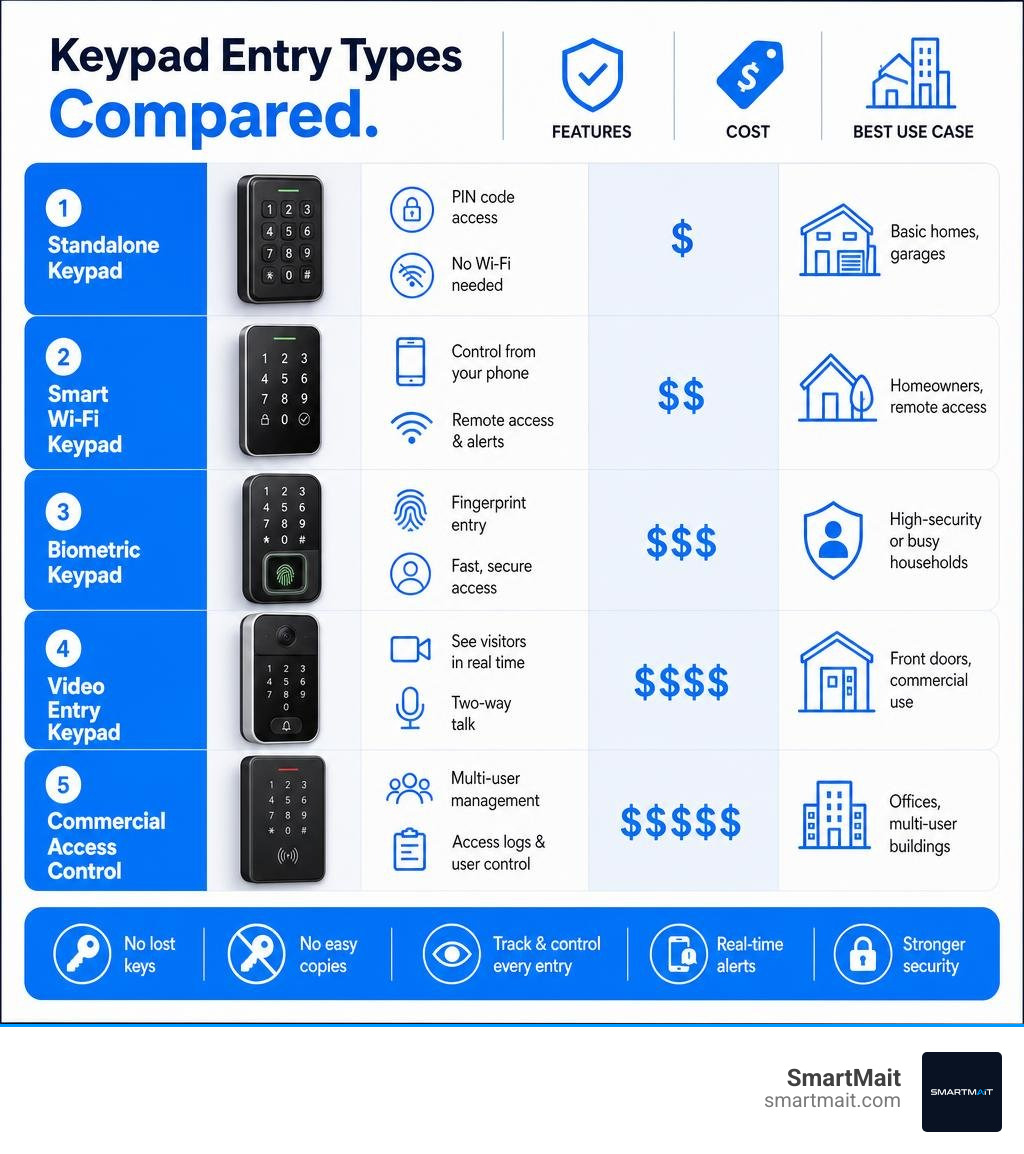
Here’s a quick look at the most common keypad entry options:
| Type | Best For | Key Feature |
|---|---|---|
| Standalone keypad | Basic homes, garages | Simple PIN access, no Wi-Fi needed |
| Smart Wi-Fi keypad | Homeowners, remote access | Control from your phone anywhere |
| Biometric keypad | High-security or busy households | Fingerprint entry, no code to forget |
| Video entry keypad | Front doors, commercial use | See and speak to visitors remotely |
| Commercial access control | Offices, multi-user buildings | Access logs, revocable codes per user |
Keys are easy to lose, easy to copy, and impossible to track. A keypad removes all three problems at once — and modern systems go far beyond just entering a PIN. Today’s options range from a $50 standalone deadbolt to a fully integrated smart lock that logs every entry, sends alerts to your phone, and locks itself automatically if you forget.
Whether you manage a $1.5M home in Bloomfield Hills or a medical office in Troy, the right system depends on your doors, your users, and how your building needs to behave.
I’m Dominic Hesano, owner of SmartMait and a low voltage installation specialist serving Southeast Michigan — I’ve installed and integrated door entry keypad systems across dozens of residential and commercial properties, from simple keyless deadbolts to multi-door access control networks. In this guide, I’ll walk you through every option worth knowing about so you can choose with confidence.
Door entry keypad terms at a glance:
- access control controller
- fob door entry system
- cloud based access control
What is a Door Entry Keypad and How Does It Work?

At its core, a door entry keypad is an electronic switch that replaces or bypasses a traditional physical key cylinder. Instead of using a metal key to physically turn a lock mechanism, you enter a numeric personal identification number (PIN) on a capacitive or mechanical button field.
When the correct code is entered, the keypad’s internal circuit board verifies the PIN and sends an electrical signal to an electronic lock actuator, such as an electromagnetic lock (maglock), an electric strike, or a motorized deadbolt. In advanced setups, this signal is routed through a centralized controller that verifies the permissions of that specific code before releasing the latch.
For businesses and modern homes, moving away from mechanical keys is a major operational upgrade. If you are still relying on traditional brass keys, you are leaving your property vulnerable to copying, lock picking, and zero accountability. To understand why this transition is so critical, read our deep dive on Why Your Building Access Systems Need a Digital Upgrade.
Key Benefits of a Door Entry Keypad for Businesses
For commercial properties in commercial hubs like Southfield, Troy, and Warren, managing physical keys is an administrative headache. When an employee leaves, you are faced with a choice: pay hundreds of dollars to rekey the entire facility, or pray they didn’t make a copy.
A commercial door entry keypad system solves this entirely by offering:
- High User Capacity: Modern systems can easily handle hundreds of unique user codes. For example, high-end modular panels can store dozens of distinct entry codes, allowing every single employee to have their own PIN.
- Detailed Access Logs: You will know exactly who entered which door, and at what time. If inventory goes missing from a back room in your Rochester warehouse, the access log tells you exactly who opened that door.
- Time-Restricted Permissions: You can program codes to work only during specific hours. A cleaning crew’s code can be restricted to Tuesday evenings between 6:00 PM and 9:00 PM, rendering it useless at any other time.
- Simplified Revocation: When an employee leaves your company, you don’t need to collect a key. You simply delete their code from the system in seconds.
To secure your commercial facility properly, you need a system that integrates seamlessly with your existing infrastructure. Businesses looking to protect their assets can find specialized design and deployment advice by reading about how to Secure Your Workspace with Modern Door Access Control Solutions.
For local businesses in Southeast Michigan, we recommend partnering with professional integrators to design a robust, hardwired system that meets regional installation standards and utilizes high-capacity commercial platforms.
Choosing the Right Door Entry Keypad for Your Home
For residential properties in affluent communities like West Bloomfield, Franklin, and Birmingham, the priority shifts toward a balance of high-end aesthetics, weather resistance, and smart home integration.
When choosing a residential keypad, consider the following details:
- Weather Resistance: Michigan winters are brutal. Your outdoor keypad must handle sub-zero temperatures, heavy snow, and spring downpours. Look for units with an IP54 or IP55 ingress protection rating, which ensures protection against dust and water jets.
- Aesthetic Integration: A cheap, plastic keypad ruins the curb appeal of a custom entry door in Bloomfield Hills. Modern architectural systems offer flush-mounted, modular designs made of brushed stainless steel, anodized aluminum, or lacquered metal alloys.
- Z-Wave Ecosystem Compatibility: Rather than using a standalone Wi-Fi lock that drains its battery in three months and operates on an unstable consumer app, we recommend Z-Wave-enabled keypads. These integrate directly into a professional home automation hub, allowing your lock to communicate with your security system, outdoor lighting, and climate control.
For a comprehensive breakdown of what to look for before purchasing a residential lock, check out our guide on Key Entry System: What You Need to Know Before You Lock Up.
If you are planning a complete front door renovation, it is highly beneficial to coordinate your lock selection with professional door installers. Additionally, if you need to secure secondary entry points like garages, you can learn about reliable garage-specific hardware from the Wayne Dalton Wireless Keyless Entry Keypad.
Key Types of Keyless Entry Systems
The market for keyless entry has expanded dramatically, offering solutions for every budget and security requirement. Understanding the mechanical and digital differences between these systems is key to making an informed investment.
- Standalone Keypads: These are self-contained, battery-powered locks that do not connect to the internet or a central network. They are highly reliable, immune to network outages, and perfect for side doors, detached garages, or mechanical rooms. Popular models like the TEEHO TE001 or the classic Schlage FE575 are staples in this category, offering simple, no-fuss keyless deadbolts.
- Smart Wi-Fi Locks: Operating on your home’s Wi-Fi network, these locks allow you to lock, unlock, and manage codes from a smartphone app. While convenient, consumer-grade Wi-Fi locks are notorious for high battery consumption and potential wireless interference.
- Biometric Integration: Combining a numeric keypad with a high-resolution fingerprint scanner, these locks provide an exceptionally high level of security. They are excellent for busy families in Rochester Hills where kids might forget their PINs but will always have their fingers.
- Architectural Modular Systems: Designed for premium residential and commercial buildings, these systems separate the keypad from the locking mechanism. Devices like the Gira System 106 Keyless In keypad module feature capacitive, wear-free key fields with glass surfaces. These flush-mount units do not show wear patterns over time, preventing intruders from guessing your PIN based on worn-down buttons.
To explore how keypads compare to other gate and perimeter security options, check out our article on Why the Gate Entry Keypad is Still King of Access.
Standalone vs. Integrated Keypad Systems
When designing an entry system, you must choose between a standalone lock (where the brain and the lock are in the same unit on the door) and an integrated system (where the keypad talks to a centralized controller and other smart devices).
Integrated systems often feature video entry, allowing you to see and speak with visitors before granting access. High-performance systems like the APKITKP – Video Entry System with Code Access | Aperta or the APDSSWKP – Single Way Video Door Station w/ Keypad | Aperta combine a high-resolution color camera with a physical keypad. This allows residents to enter via a PIN, while visitors can ring a 7-inch hands-free TFT monitor inside the home.
For multi-unit buildings or commercial offices in Royal Oak, modular systems like the Keypad Module – Alpha | Shop | Urmet allow you to combine a digital directory with a secure entry keypad. These systems can be wired into advanced European-style door stations such as the Gira Gira Keyless In Keypad System 55 or the Gira Gira Keyless In Keypad System 70, which support up to 255 unique codes of up to 32 digits in length.
To understand how these keypads communicate with the rest of your building, read our comprehensive overview of the Everything You Need to Know About Your Access Control Controller.
Smart Home and Z-Wave Ecosystem Integration
At SmartMait, we do not install consumer-grade, fragmented Wi-Fi smart locks that drop offline when your router gets warm. Instead, we build our smart homes and commercial networks on the Z-Wave protocol.
Z-Wave is a dedicated, mesh-network wireless communication standard designed specifically for smart home devices. It operates on a low-frequency radio band (around 908 MHz in the US), which means it does not compete with your phones, laptops, and streaming devices on the crowded 2.4 GHz or 5 GHz Wi-Fi bands.
When your door entry keypad is Z-Wave enabled, it acts as a node in a secure, encrypted mesh network. This offers several massive advantages:
- Exceptional Battery Life: Because Z-Wave requires a fraction of the power of Wi-Fi, your keypad batteries will last up to a year or more, rather than a few months.
- Unmatched Reliability: If your internet goes down, your Z-Wave network still functions locally. Your keypad will still talk to your smart home hub, your security system, and your automated lighting.
- Whole-Home Scenes: Entering your unique code on a Z-Wave keypad doesn’t just unlock the deadbolt. It can disarm your alarm system, turn on the hallway lights, and set your thermostat to your preferred temperature.
To see how Z-Wave keypads can be integrated into larger perimeter security systems, read our Gate Access Control Systems: A Buyers Guide to Better Security. For a look at how physical credentials can augment these systems, you can explore commercial-grade hardware solutions from Keypad Security & Access Control Systems – Nice/Linear and Single Door Access Control | Nice/Linear.
Keypad Locks vs. Traditional and Smart Lock Alternatives
How does a keypad lock stack up against traditional keys or other smart options? Let’s break down the mechanics:
| Feature | Traditional Keyed Lock | Standalone Keypad | Smart Z-Wave Keypad |
|---|---|---|---|
| Primary Credential | Physical Metal Key | 4-8 Digit PIN | PIN, Fingerprint, or Phone |
| Physical Security | Vulnerable to picking/bumping | Immune to picking; tamper alarms | Immune to picking; instant alerts |
| Access Tracking | None | None | Real-time user logs with names |
| Remote Management | Impossible | Manual programming at lock | Full remote control from app |
| Key Copying Risk | High (keys can be copied at any kiosk) | Zero (codes cannot be physically copied) | Zero (temporary codes can auto-expire) |
Traditional locks are highly vulnerable to physical bypasses like lock bumping or picking. A door entry keypad removes the keyway entirely, or hides it behind a secure faceplate, making physical manipulation incredibly difficult.
If you are interested in comparing keypads with alternative high-tech entry options like RFID or smart cards, check out The Ultimate Guide to Modern Card Access Technology as well as our Key Card Access Systems: A Buyer Guide for the Security Obsessed.
Security and Durability Considerations
When selecting a keypad, look for hardware certified by the Builders Hardware Manufacturers Association (BHMA). A BHMA Grade 1 certification is the highest level of residential and commercial security, tested to withstand heavy physical impacts and hundreds of thousands of cycles.
Additionally, look for these security features:
- Tamper Detection: High-quality keypads feature built-in accelerometers. If someone attempts to pry the keypad off the wall, a loud local alarm will sound, and a signal can be sent to your central security system.
- Capacitive Glass Touchscreens: Mechanical buttons wear down over time. An intruder can easily guess a 4-digit code if the 1, 3, 7, and 9 buttons are visibly faded or shiny. Capacitive glass screens prevent wear patterns entirely.
- Anti-Peep Code Protection: This feature allows you to enter random digits before or after your actual PIN. If your code is
4592, you can type99284592113on the keypad, and the door will still unlock. This prevents anyone standing nearby from memorizing your code.
Installation and Maintenance Best Practices
While a basic standalone deadbolt can be installed with a screwdriver in about 30 minutes, integrating a professional, whole-home Z-Wave access system requires low-voltage expertise.
Proper physical installation requires confirming your door’s backset (typically 2-3/8 or 2-3/4 inches) and ensuring the door frame strike plate is secured with 3-inch heavy-duty screws. This anchors the lock deep into the wood framing of your home, preventing forced entry.
To keep your system running flawlessly, we recommend the following maintenance routine:
- Annual Battery Replacements: Don’t wait for the low-battery warning. Replace your batteries every autumn before the Michigan freeze sets in.
- Regular Code Audits: Delete old codes for former dog walkers, contractors, or ex-employees.
- Clean the Keypad: Wipe down your touchscreen monthly to remove fingerprint smudges that could reveal your PIN.
For our clients in Oakland County, we eliminate this chore list entirely through our SmartService concierge maintenance program. We don’t just install your system and disappear. We provide ongoing software updates, battery replacements, and physical hardware inspections to ensure your home or office remains perfectly secure year-round.
Frequently Asked Questions About Keypad Access
How secure are keypad door locks against hacking?
High-quality smart keypads use bank-grade AES-128 or AES-256 encryption to secure the wireless signal between the lock and your smart home hub. This makes digital hacking virtually impossible. The primary security risk is not digital hacking, but “shoulder surfing” (someone watching you type your PIN) or using weak, easily guessable codes like 1234 or 1111. Using 6-to-8 digit codes and enabling anti-peep protection mitigates this risk completely.
What happens to a keypad lock when the battery dies?
Most high-end keypad locks provide multiple layers of backup. First, they will flash low-battery warnings or send push notifications to your phone weeks before they die. If the battery does fail completely, most units feature a physical key override hidden behind a secure magnetic faceplate, or external terminal contacts where you can touch a 9V battery to temporarily power the screen and enter your code.
Can keypad entry systems integrate with existing security setups?
Yes, provided you choose the right communication protocol. A Z-Wave-enabled keypad can be paired with your existing security panel, outdoor cameras, and lighting systems. When integrated correctly, entering your PIN can simultaneously disarm your alarm, turn on your interior entryway lights, and release the deadbolt.
Conclusion

A door entry keypad is more than just a convenient way to unlock your front door. It is the foundation of a modern, secure, and highly automated building. Whether you are looking to secure a private estate in Bloomfield Hills or streamline employee access at an office in Troy, upgrading to keyless access is an investment that pays immediate dividends in security and peace of mind.
At SmartMait, we specialize in designing, installing, and maintaining premium low-voltage systems across Southeast Michigan. We are not just installers — we are your long-term technology partners. Through our signature SmartService concierge maintenance program, we ensure your smart home and commercial access systems operate flawlessly, year after year.
Ready to ditch your keys for a smarter, more secure solution? Contact us today to design a custom access control system for your property.