Everything You Need to Know About Scanning Building Access Cards
How to Scan a Building Access Card
To identify an unmarked or worn badge, an authorized administrator uses an access card scanner that supports the card’s technology. The scanner sends the card ID to management software, where the administrator can check it against the building’s records. Scanning identifies a credential; it does not automatically copy it to a phone or grant access.
For a Troy or Oakland County facility, start by checking which cards and access system you already use. An integrator can then choose a compatible scanner and set up a secure process for checking and issuing credentials. Learn more about SmartMait’s commercial access control services, or request a consultation to discuss your building.
I’m Dominic Hesano, and my work in security systems and low-voltage wiring has taught me how much reliable access depends on getting the whole system right. That same approach applies to an access card scanner: it should fit your existing credentials and the way your team manages them.
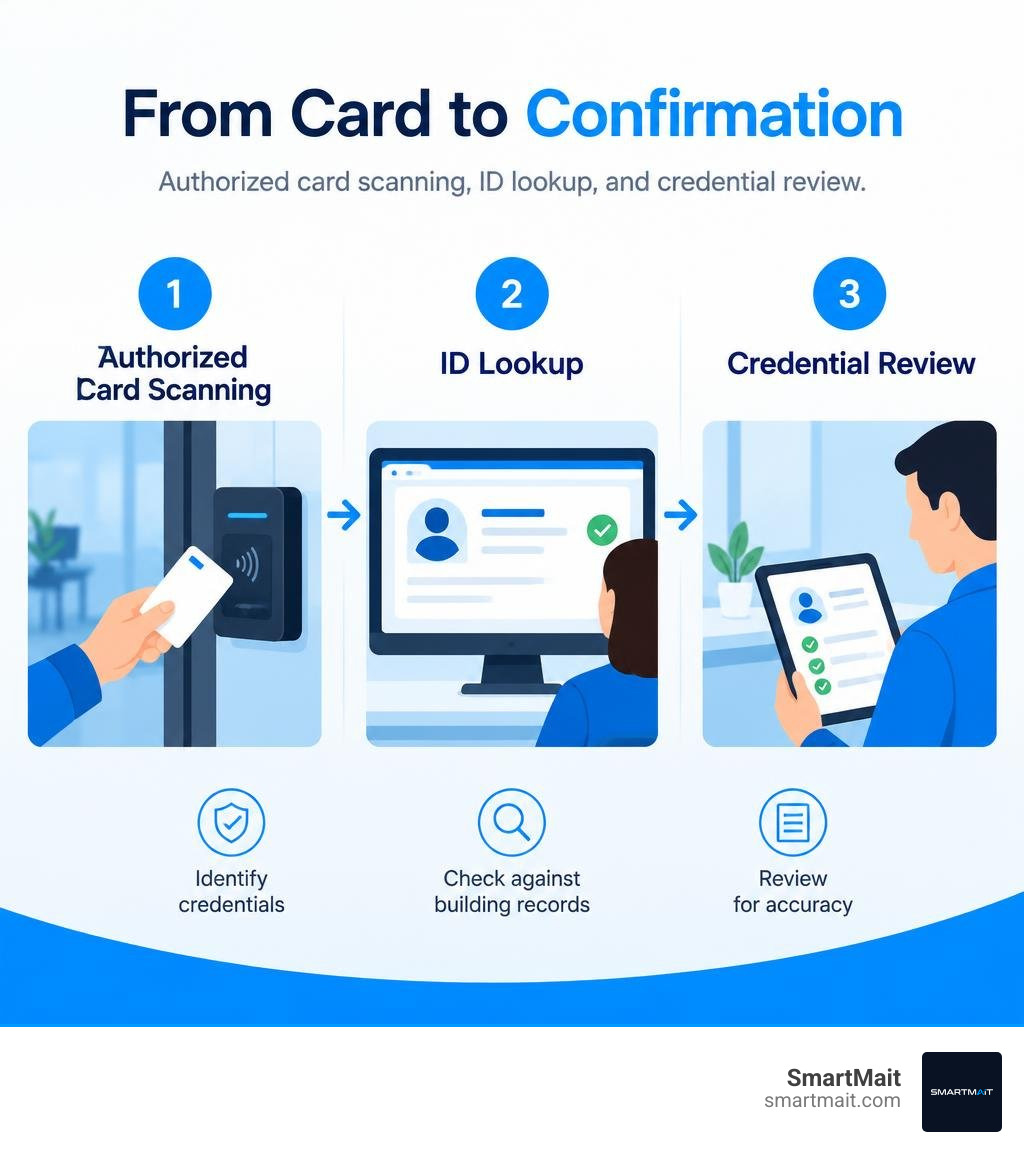
Access card scanner terms simplified:
Understanding the Access Card Scanner in Modern Commercial Facilities
Managing facility security across commercial office spaces, medical clinics, and multi-tenant commercial properties requires an accurate way to handle physical credentials. As explored in The Ultimate Guide to Modern Card Access Technology, modern access control relies on pairing physical credentials with robust database management. An access card scanner acts as the administrative bridge between physical plastic cards and the software database that governs entry permissions.

In a commercial environment, a dedicated administrative scanner is deployed at the enrollment desk, security office, or reception workstation. Instead of sending staff to walk out to an exterior door reader to test whether a keycard functions, administrators present the card directly to the desktop scanner. The device reads the encoded facility code and internal serial number, immediately populating the management platform for credential enrollment planning, card diagnostics, user reassignment, or auditing.
Proper credential diagnostics keep facility directors from guessing whether an access issue stems from a faulty credential, a deactivated user profile, or a hardware failure at the perimeter door.
How an Access Card Scanner Identifies Unmarked and Worn Credentials
In commercial facilities, security best practices often dictate leaving physical keycards unprinted without visible badge numbers or company names. If an employee misplaces an unprinted card outside an office in Troy or Birmingham, an unauthorized finder cannot determine which building or company it unlocks.
However, unmarked credentials present an administrative challenge when found on-site. Without visible text, building managers cannot easily tell who owns a misplaced badge. Physical wear and tear from everyday pocket friction also erases hot-stamped external numbering over time.
An administrative scanner solves this instantly:
- Card Interrogation: The administrator places the mystery badge on the desktop enrollment scanner.
- Data Extraction: The device captures the non-volatile internal card ID, bit structure, and site code without relying on surface-level visual markings.
- Database Correlation: The administrative software queries the access control database to locate the active credential record.
- Credential Reassignment or Deactivation: The property manager quickly identifies the cardholder, returns the badge, or revokes it if it was reported lost.
Understanding why the badge access door system is still king highlights how physical credentials remain a foundation for facility auditing, provided staff have the desktop tools to manage them efficiently.
Administrative Scanners vs. Wall-Mounted Door Readers
It is common to confuse an administrative access card scanner with an exterior wall-mounted reader, but they fulfill distinct roles within an access infrastructure.
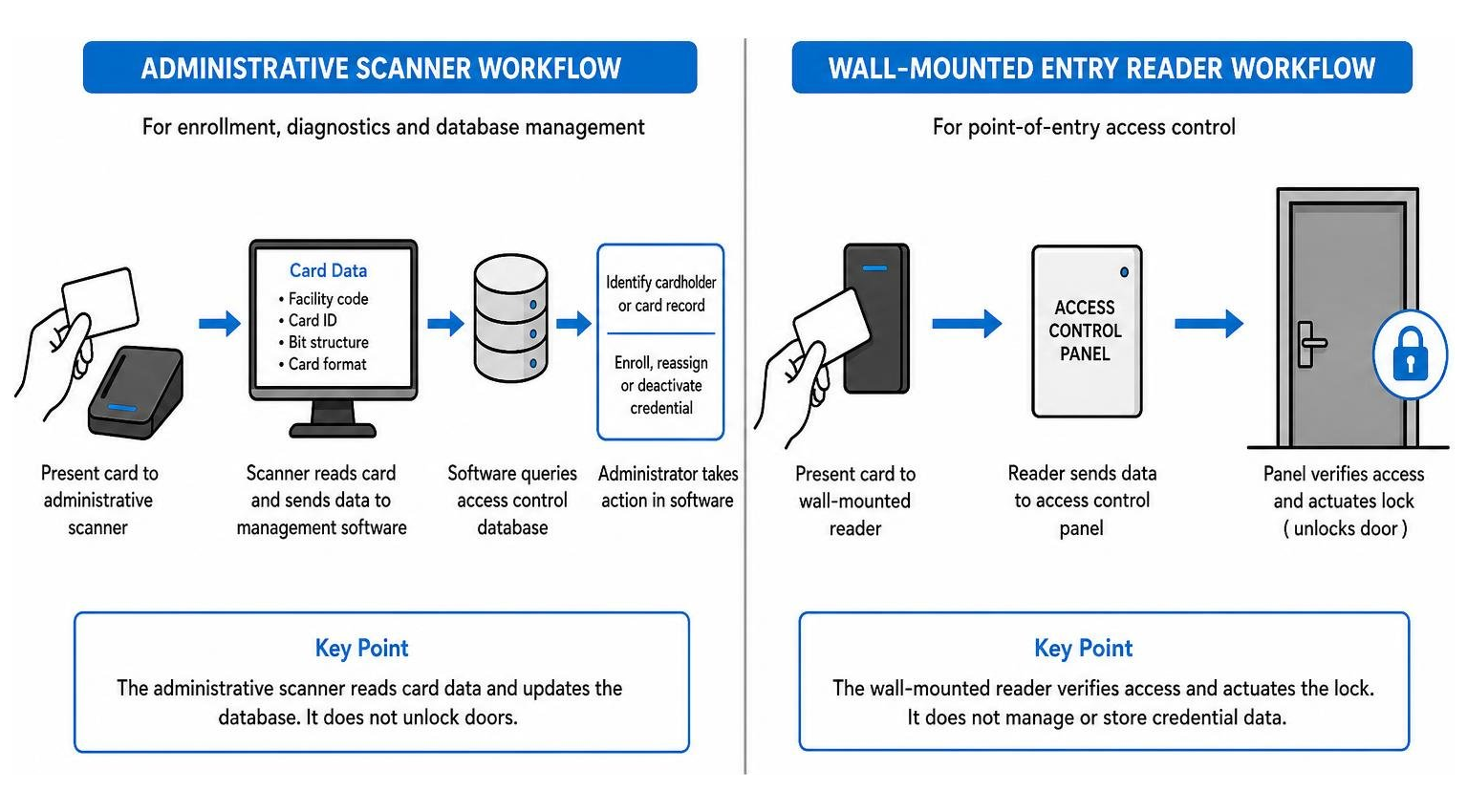
A wall-mounted access reader is wired directly to an electrified locking mechanism via an access control field panel. Its primary function is point-of-entry security: it reads data, sends signals to the door controller, and unlocks the door when access is granted.
An administrative scanner connects directly to an administrative computer via USB or network protocols. It does not actuate an electric strike or magnetic lock. Instead, it reads the card format, displays card data for administrative review, and injects the credential ID directly into the enrollment software. Professional integrators ensure both desktop enrollment scanners and entry door readers are configured to read the exact same encryption formats and bit structures. This level of coordination is central to how we secure your workspace with modern door access control solutions.
Technical Compatibility: Frequencies, Protocols, and Wiring Standards
Access credentials are not universal. Different cards operate across distinct electromagnetic frequencies, communication protocols, and cryptographic standards. Choosing the right scanner requires matching the hardware to your facility’s specific card ecosystem.
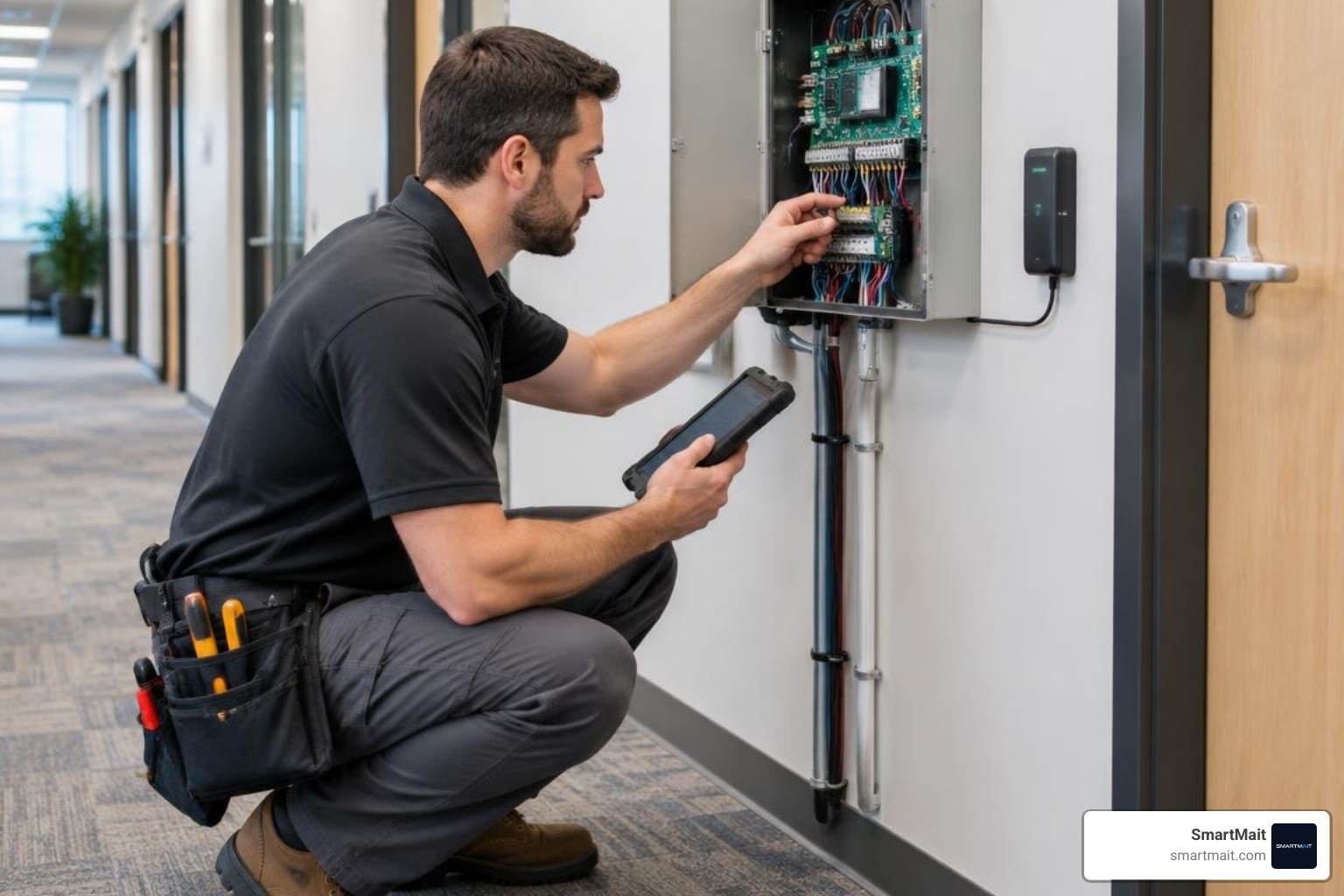
Commercial systems generally fall into two frequency categories:
- 125 kHz Proximity (Low Frequency): Legacy standards such as standard 125 kHz Prox and ProxPlus Secure transmit unencrypted credential numbers over short distances. While still common in legacy buildings across Oakland County, low-frequency cards lack cryptographic validation and remain vulnerable to simple handheld cloning devices.
- 13.56 MHz Smart Cards (High Frequency): Modern contactless smart cards, including MiFare Classic (utilizing 4-byte or 7-byte unique identifiers) and advanced encrypted credentials, offer mutual authentication and encrypted memory sectors. These smart cards resist unauthorized duplication and support multi-application profiles, such as combining door entry with secure print management and cafeteria payments.
Protocol Architecture and Wiring Considerations
When planning access infrastructure, the hardware communication protocol dictates system performance, wiring distance, and data security. The field controller coordinates all reader signals, making it vital to understand everything you need to know about your access control controller.
Two primary protocols dominate commercial installations:
- Wiegand Protocol: The historic standard for point-of-entry card readers. Wiegand connections use separate Data 0 and Data 1 conductors. To ensure clean signal transmission and prevent transmission drops, Wiegand wiring requires shielded cable with wire impedance of 2 ohms or less and a maximum run distance of 80 meters (typically installed using UL1061 18 AWG shielded wiring).
- RS-485 and OSDP (Open Supervised Device Protocol): Modern enterprise installations use RS-485 serial communication paired with the Open Supervised Device Protocol (OSDP). RS-485 architecture allows bidirectional, supervised communication between readers and controllers over distances up to 100 meters with wire impedance of 10 ohms or less (using UL1061 24 AWG shielded wiring). OSDP supports AES-128 encryption, eliminating eavesdropping and data tampering between the perimeter reader and the central control board.
Administrative desktop scanners bypass field controller wiring by communicating directly with the client workstation via high-speed USB interface or secure local IP connections.
System Capabilities to Discuss With an Access Control Integrator
When evaluating scanning hardware and reader infrastructure with a professional low-voltage integrator, facility managers should verify several critical technical benchmarks:
- Multi-Technology Decoding: Ensure administrative scanners and field readers support multi-class credentials, allowing low-frequency 125 kHz Prox and high-frequency 13.56 MHz MiFare cards to coexist during facility upgrades.
- Sub-200ms Processing Latency: Optical and RFID scanning engines must decode credential payloads in under 200 milliseconds to avoid bottlenecks at high-traffic entry points.
- Audible and Visual Status Prompts: Scanners must provide clear status LEDs (such as green for authorized, red for unauthorized, and flashing blue for firmware updates) along with distinct audio beeps for user feedback.
- Supervised Tamper Alarms: Wall-mounted entry scanners require optical or mechanical tamper sensors that alert central security if a reader is removed from its mounting plate.
- Environmental and Electrical Resilience: Exterior readers must meet IP65 weather ratings, operate across extreme Midwest temperature swings (-20°C to 70°C), and incorporate over-voltage and electrical watchdog protections.
QR Codes vs. RFID vs. Mobile Credentials: How Scanning Methods Compare
Commercial facilities are rapidly expanding beyond traditional plastic badges. Modern commercial entries increasingly incorporate dynamic optical QR codes and smartphone-based digital keys.
| Credential Type | Operating Frequency / Optical Spec | Read Range | Typical Read Speed | Best Commercial Application | Security Level |
|---|---|---|---|---|---|
| 125 kHz Proximity | 125 kHz RF | 2.5 cm – 10 cm | < 150 ms | Legacy office retrofits, basic staff entry | Low (Susceptible to cloning) |
| 13.56 MHz Smart Card | 13.56 MHz High Frequency | 2.5 cm – 8 cm | < 100 ms | Corporate campuses, healthcare, financial | High (Encrypted memory, anti-cloning) |
| Optical QR Code | 1D / 2D Barcode (3000K LED) | 0 cm – 20 cm | < 200 ms | Visitor access, conference facilities, vendors | Medium (Time-expiring dynamic codes) |
| BLE Mobile Credential | 2.4 GHz Bluetooth Low Energy | 0.5 m – 10 m (Adjustable) | Hands-free / Instant | Executive parking, perimeter gates, modern suites | Very High (Encrypted tokens, biometric lock) |
Optical QR and Barcode Scanning Integration
Integrating optical scanners allows commercial facilities to streamline guest intake and contractor access. Modern optical readers decode 1D barcodes, 2D Data Matrix, PDF417, and standard QR codes from physical paper badges or smartphone screens.
Understanding why your building access systems need a digital upgrade illustrates how modern optical terminals elevate visitor management:
- Automated Digital Check-In: Meeting guests receive an automated calendar invitation containing an encrypted QR pass sent directly to their email.
- Dynamic Time Expiration: Unlike physical badges that can walk off-site, visitor QR credentials can be set to activate 10 minutes prior to a scheduled meeting and self-revoke immediately after.
- Anti-Glare Optical Engineering: High-grade optical modules incorporate soft 3000K white LED illumination and low current consumption (drawing approximately 68 mA) to eliminate screen reflection and glare when reading visitor smartphones.
- High-Capacity Event Logging: Enterprise optical terminals store up to 20,000 local credentials and 64,000 off-line event logs, ensuring uninterrupted operation even during localized network drops.
Mobile Credential Scanning and Hands-Free Gate Access
Bluetooth Low Energy (BLE) readers transform authorized smartphones into hands-free access credentials. Users can approach a secured entrance without opening an app or tapping their phone against hardware. The reader detects user approach, authenticates the device’s secure cryptographic token, and unlocks the entrance seamlessly.
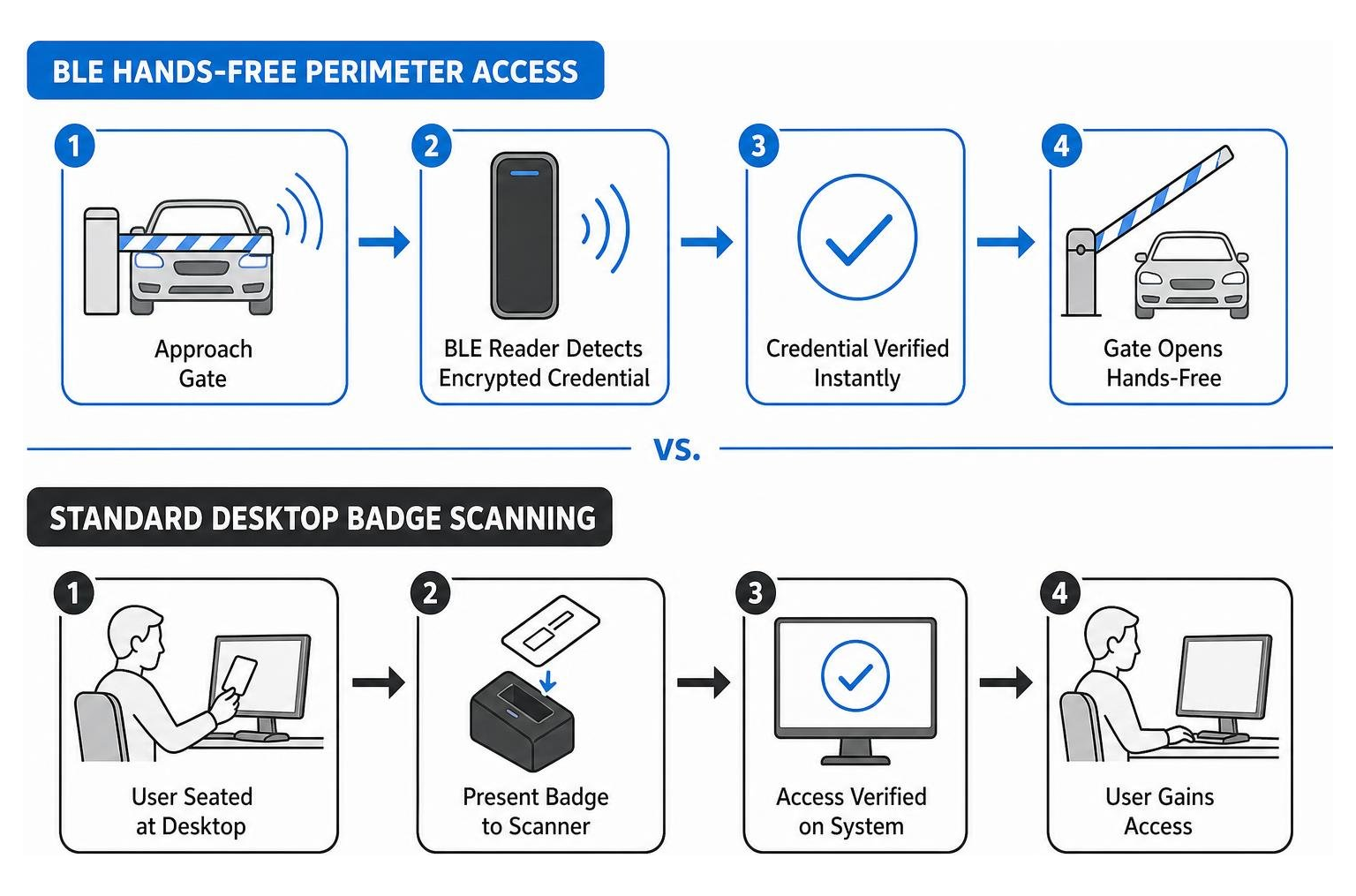
This technology proves especially valuable for perimeter vehicle barriers and parking facilities, demonstrating why every modern property needs a gate card reader. Drivers can enter commercial parking structures without rolling down windows in freezing Michigan winter weather, while security teams maintain complete logging of every vehicle entry.
Planning Access Card Scanning Workflows for Commercial Facilities
Deploying an access card scanning infrastructure requires a structured plan that aligns hardware, software, and administrative workflows. When managing commercial access, reviewing key card access systems: a buyer guide for the security obsessed ensures your hardware layout matches facility traffic flow.
A comprehensive facility scanning layout typically incorporates three administrative layers:
- Enrollment Stations (Reception and Security Offices): Dedicated USB desktop scanners connected to central administration workstations for rapidly onboarding new hires, replacing lost badges, and diagnosing unmarked cards.
- Perimeter and Tenant Doors: Wall-mounted, weather-rated OSDP multi-technology readers mounted on mullions or single-gang boxes to control building access.
- High-Security Specialized Zones: Server rooms, executive suites, and records archives equipped with dual-authentication scanners requiring both an encrypted card tap and a PIN code entry.
Commercial Security and Anti-Cloning Best Practices
Issuing credentials without strict data protection opens facilities to perimeter vulnerabilities. Low-voltage integrators follow structured protocols to protect access networks from unauthorized interception and cloning:
- Phase Out Unencrypted 125 kHz Prox: Transition legacy low-frequency cards to encrypted smart cards or mobile tokens to prevent badge skimming.
- Mandate OSDP Encryption for All Field Readers: Replace legacy unencrypted Wiegand wiring with supervised OSDP over RS-485 to prevent physical line tapping behind wall-mounted card readers.
- Implement Network Segmentation and HTTPS: Isolate all access control servers, IP door controllers, and administrative workstations on dedicated, firewall-protected virtual local area networks (VLANs), requiring HTTPS and strong password policies for all management endpoints.
- Maintain Routine Firmware Updates: Schedule quarterly updates for reader firmware and controller software to patch security vulnerabilities and maintain protocol standards.
- Enforce Regular Access Audits: Conduct automated monthly reviews to identify and deactivate orphaned credentials assigned to former employees or expired contractors.
Frequently Asked Questions About Access Card Scanners
What is the primary difference between an access card scanner and a standard door reader?
An administrative access card scanner connects directly to a management workstation (typically via USB) to read credential numbers, diagnose card formats, and enroll users into access control software. It does not control an electric door lock. A standard door reader is mounted at an entrance and wired to a field access controller, actuating electric strikes or magnetic locks when an authorized credential is presented.
How can administrators identify unmarked or worn key cards?
When badges lose their printed identification numbers through physical wear or were intentionally issued unmarked for security purposes, administrators place the card onto an administrative USB desktop scanner. The scanner reads the internal RF chip serial number and facility code, sending the data into the management software to instantly pull up the associated user record.
Can modern access scanners support both physical RFID badges and smartphone credentials?
Yes. Modern multi-technology scanners and readers support dual-frequency RFID (125 kHz Prox and 13.56 MHz MiFare smart cards) alongside integrated Bluetooth Low Energy (BLE), NFC, and optical QR scanning. This multi-format support allows property managers to transition from physical badges to mobile credentials at their own pace without replacing their entire reader infrastructure.
Conclusion
Managing building credentials across commercial properties in Troy, Rochester Hills, Birmingham, and throughout Oakland County requires a well-engineered balance of administrative desktop scanners, secure field readers, and robust software management. Choosing compatible scanning hardware prevents security blind spots, streamlines employee onboarding, and eliminates the guesswork of identifying unmarked credentials.
SmartMait delivers professional low-voltage system design, hardware installation, and structured cabling for commercial facilities across Southeast Michigan. Beyond initial installation, our ongoing SmartService maintenance program ensures your access control panels, perimeter scanners, and credential databases remain fully operational, secure, and up to date.
Ready to upgrade your building’s entry security? Contact us to explore our commercial access control solutions or schedule an on-site consultation with our low-voltage engineering team today.