Self-Monitored Security Systems: Watching Your Own Back
Is Alarm System Self-Monitoring Right for Your Home?
Alarm system self-monitoring means your home sends alarm alerts directly to you, not to a 24/7 monitoring center. When a door sensor, motion detector, or camera triggers, the system can sound a local siren and send a push alert to your phone. You decide whether to check video, dismiss a false alarm, call a neighbor, or contact 911.
It can be a smart fit if you want control and want to avoid recurring monitoring fees. But it only works well when the system has reliable sensors, a loud local siren, clear phone alerts, camera coverage at key entries, and a plan for internet or power outages.
Professional monitoring usually costs about $15 to $50 per month. Self-monitoring can remove that ongoing cost, but it also makes you responsible for seeing alerts and taking action. For a high-value home, the key question is not simply whether alerts arrive quickly. It is whether the system still protects the property when you are in a meeting, asleep, traveling, or without dependable internet.
I’m Dominic Hesano, founder of SmartMait. Through hands-on work with security, low-voltage wiring, networks, and connected-home systems across Southeast Michigan, I have seen how thoughtful alarm system self-monitoring can work – and where a DIY-only approach can leave costly gaps.
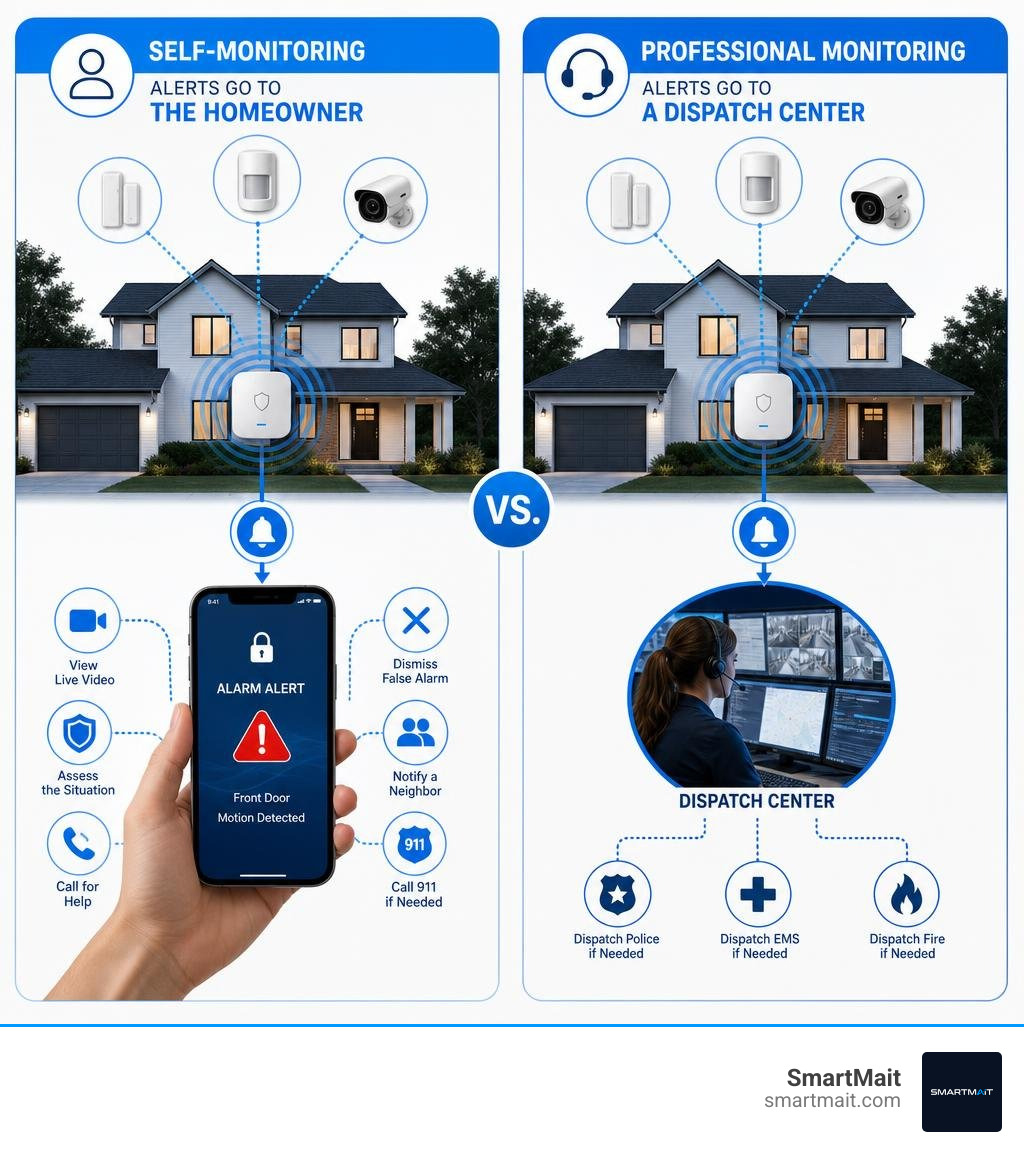
Basic alarm system self-monitoring vocab:
How Alarm System Self-Monitoring Operates Without Monthly Fees
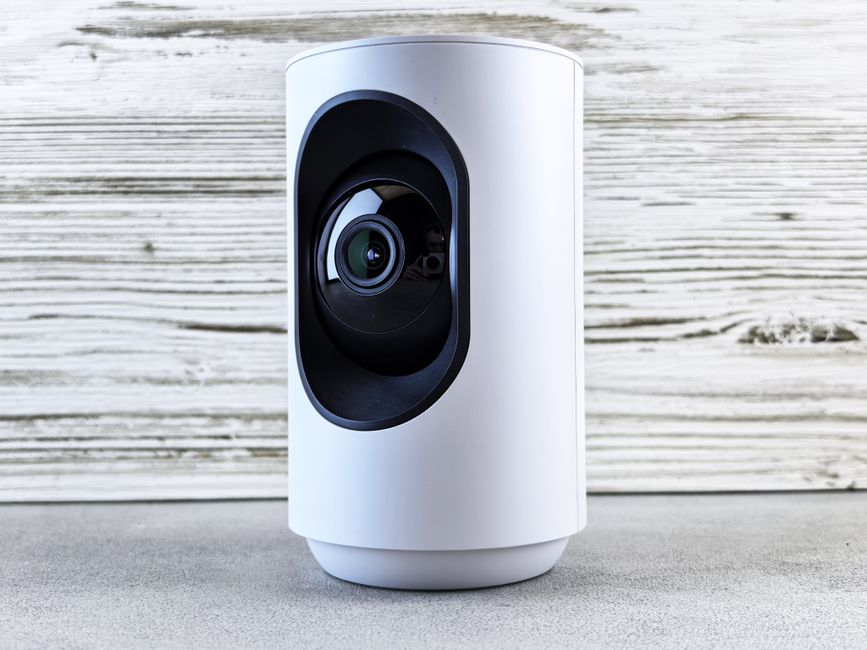
When you eliminate the central monitoring station from your security architecture, the communication path shifts entirely onto your local hardware and home network. Instead of routing encrypted alarm packets through an external monitoring call center, your hub acts as the brain, processing inputs from peripheral sensors and transmitting notifications directly to your smartphone via local broadband or Wi-Fi.
Understanding this signal workflow helps you evaluate whether taking full charge of your property’s security makes sense. You can compare this directly against traditional options in The No-Nonsense Guide to Back to Base Security Systems.
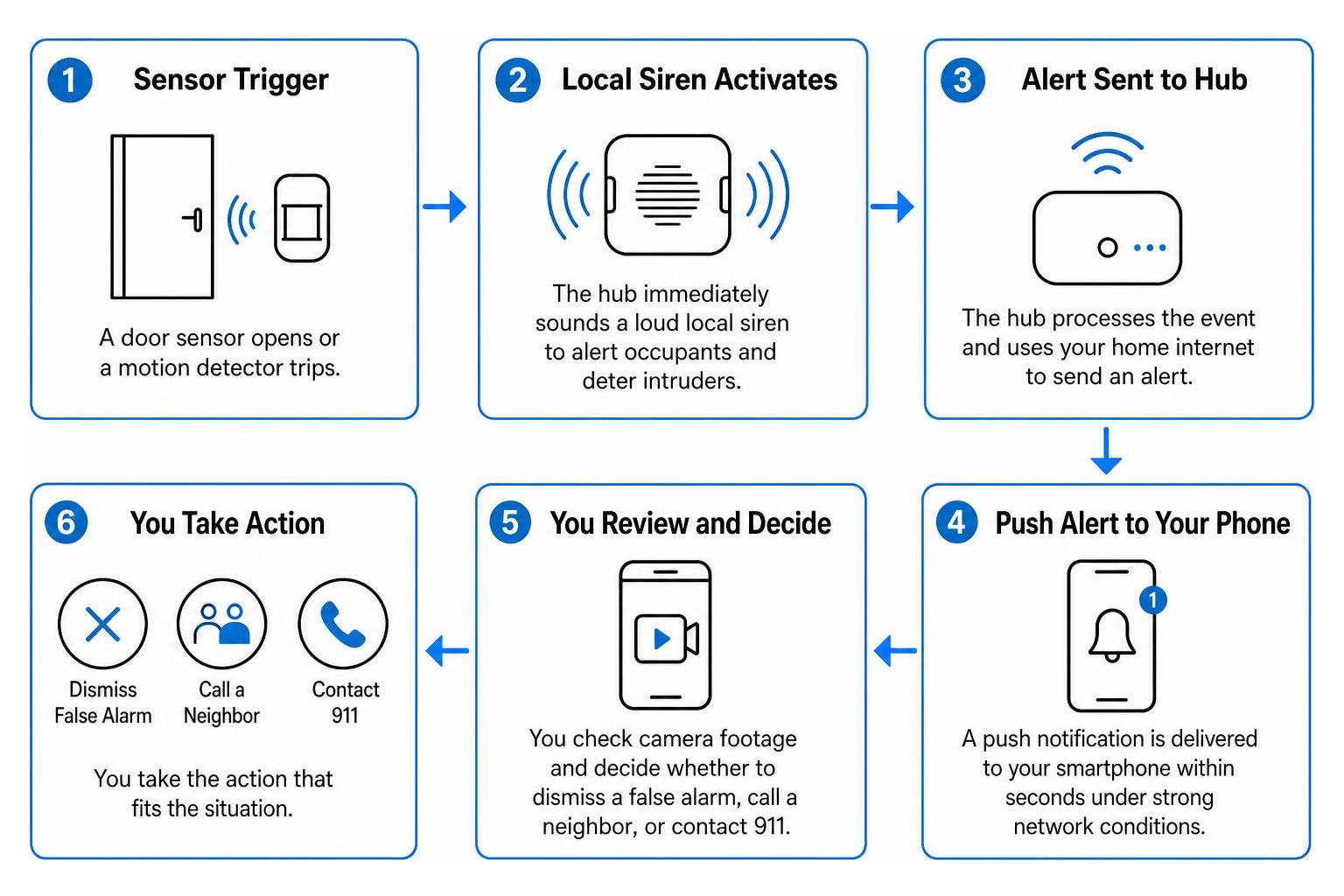
Under standard operating conditions, high-grade wireless sensors trigger instant responses. When a contact sensor breaks or a motion detector trips:
- Local Sounders Activate: The central hub immediately sounds a local siren (typically ranging from 85 dB to 110+ dB) to startle intruders and alert household occupants.
- Network Transmission: The hub uses your home’s internet path to push encrypted notifications to your mobile app.
- App Alert Delivery: Modern systems deliver push alerts within two to five seconds under strong network conditions.
- Manual User Response: You review live camera feeds or sensor logs, verify whether the event is an actual intrusion or a harmless mistake, and manually dial local emergency dispatch if needed.
Core Benefits and Savings of Alarm System Self-Monitoring
The primary draw for most homeowners is eliminating ongoing subscription costs. Professional central monitoring plans often range from $180 to over $600 per year. Over a five-year period, cutting out monthly fees saves several thousand dollars while preserving fundamental physical deterrence. For practical budgeting tips, check out our guide on How to Secure Your Home Without Breaking the Bank.
Beyond cost savings, self-monitoring provides several distinct advantages:
- Zero-Contract Freedom: You purchase and own the hardware outright. There are no multi-year lock-ins, auto-renewals, or cancellation penalties.
- Granular Privacy Control: Video footage and audio logs remain entirely under your control. No third-party dispatch operators or monitoring agents have access to your live indoor camera feeds.
- Insurance Discounts: While professionally monitored systems often earn top-tier discounts up to 20%, many property insurers still offer 5% to 15% rate reductions for certified self-monitored systems equipped with audible sirens and perimeter sensors.
- Portability for Renters and Frequent Movers: Compact wireless components can be unmounted and reinstalled in under an hour without damaging trim or drywall.
Critical Limitations and Vulnerabilities to Consider
While the financial savings are appealing, self-monitoring shifts the entire burden of emergency management squarely onto your shoulders. Understanding the potential pitfalls ensures you don’t discover a blind spot during a real emergency.
The most significant vulnerabilities include:
- Missed and Silenced Notifications: If your phone is set to Do Not Disturb, left in another room, out of battery, or in an area with poor cellular coverage, an intrusion notification will sit unread.
- Broadband and Power Dependencies: Most budget self-monitored hubs rely strictly on local Wi-Fi. If a storm knocks out utility power or an intruder cuts external cable lines, the hub loses its ability to send outbound push alerts entirely.
- Delayed Emergency Response: In a true crisis, seconds count. A central monitoring station dispatches first responders immediately after protocol verification. In contrast, self-monitoring requires you to notice the alert, open your camera feed, verify the event, find the local dispatch phone number (especially if you are traveling away from your municipality), and explain the situation.
- Life Safety Gaps: If a carbon monoxide leak or electrical fire occurs while you are asleep or unconscious, a self-monitored system cannot automatically summon the fire department.
If you prefer continuous protection without active management, explore our advice in Stop Worrying with the Best 247 Alarm Monitoring.
Comparing Self-Monitoring vs. 24/7 Professional Central Station Monitoring
Choosing between self-monitoring and professional station response comes down to balancing hands-on control against automated safety nets.
| Feature / Metric | Self-Monitored Security | 24/7 Professional Monitoring |
|---|---|---|
| Monthly Subscription Fees | $0 / month | $15 to $50+ / month |
| Emergency Dispatch Speed | Dependent on homeowner reaction time | Fast, automated dispatch by certified operators |
| Power / Internet Outages | Alerts fail without cellular/battery upgrades | Maintained via integrated LTE and battery backup |
| Life Safety (Fire, Smoke, CO) | Local sirens and app notifications only | Direct, automatic dispatch of fire rescue teams |
| Homeowners Insurance Discount | Typically 5% to 15% | Typically 10% to 20% with monitoring certificate |
| Hardware Ownership | 100% homeowner owned | Owned or leased through service provider |
| Privacy / Video Feeds | 100% private to account users | Optional live video verification by dispatch agents |
For a deeper financial breakdown of equipment and ongoing expenses, see The Real Price of Home Security Systems in 2026. Furthermore, if you live in communities with formal alarm registration codes, check local municipal guidelines such as the Bloomfield Hills Alarm Monitoring guidelines to make sure your system adheres to local false-alarm reduction policies.
Hardware Ecosystems: Full Sensor Platforms vs. Standalone Cameras
A common mistake is assuming that placing two or three smart cameras around a property equals a complete alarm system. Standalone cameras and full security platforms serve very different purposes.
- Standalone Wi-Fi Cameras: Excellent for reviewing historical footage and greeting delivery drivers. However, relying purely on camera motion detection often results in notification fatigue from passing cars, windblown trees, or wildlife. If internet connectivity drops, cameras cannot trigger an audible whole-home siren.
- Full Integrated Sensor Platforms: Combine physical perimeter contact sensors on doors and windows with wide-angle passive infrared (PIR) motion detectors, glass-break sensors, and high-decibel sirens. These trigger instant, reliable alerts based on physical breaches rather than optical pixel changes.
For the ideal setup, integrate both: use physical contact sensors to trip the alarm immediately and place strategically positioned cameras to provide visual confirmation. If you are starting small, learn more about system staging in From CCTV to Smart Alarms: Building Your First 1 Camera Security System.
The Hybrid Approach: On-Demand Monitoring and Cellular Upgrades
You don’t always have to pick just one monitoring model. Many modern DIY and professional platforms support a hybrid approach:
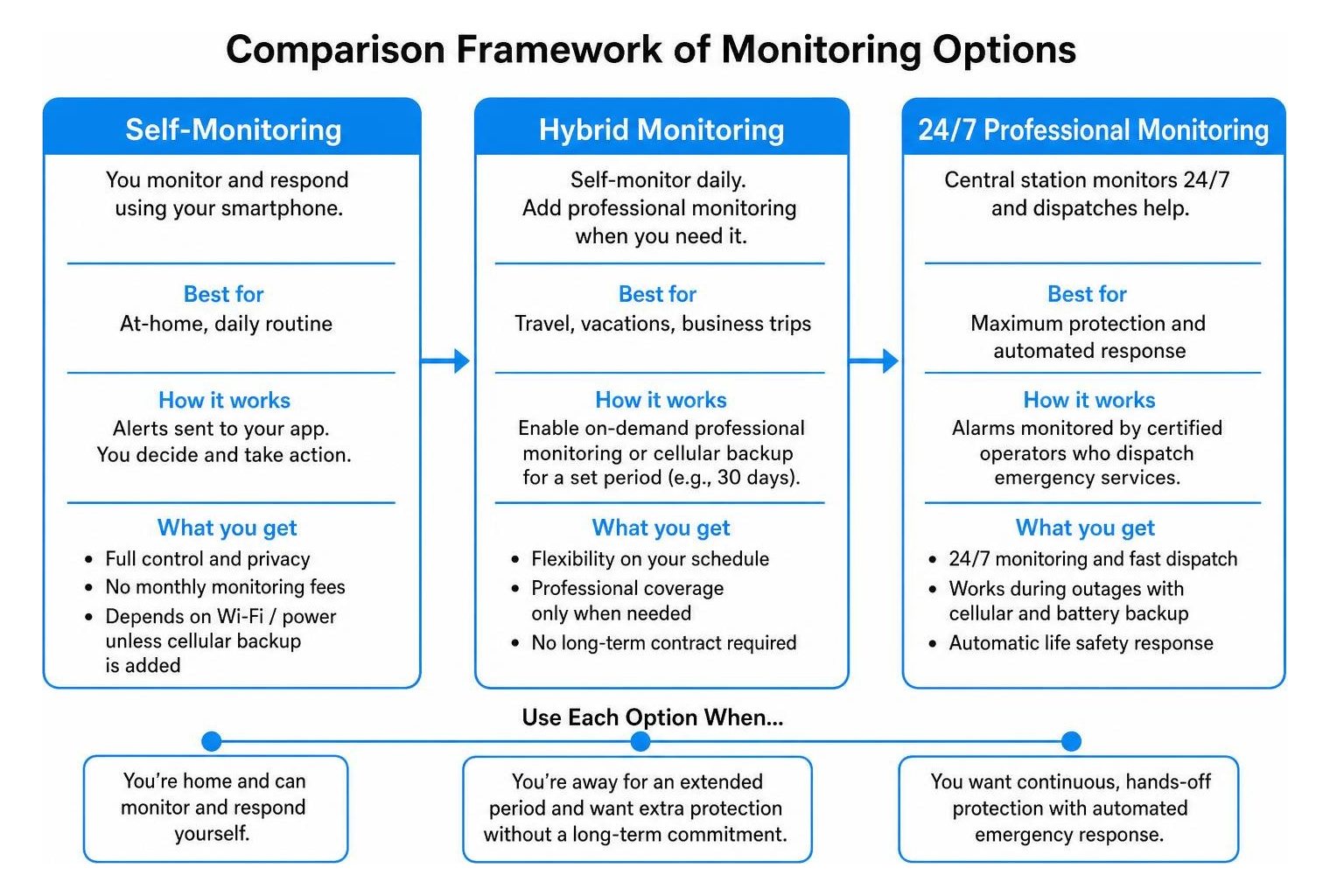
Under a hybrid model, you handle self-monitoring on your smartphone during your normal weekly routine. When you leave home for an extended vacation or business trip, you can activate on-demand professional central station monitoring or temporary cellular backup for 30 days without signing a long-term contract. To explore flexible options, see How to Get Professional Security Monitoring on a Budget.
Optimizing Your DIY Security Setup for Maximum Reliability

If you choose to self-monitor, taking extra steps to optimize your installation will help prevent false alarms and ensure you never miss a critical alert.
- Configure Smartphone Permissions for Critical Alerts: On both iOS and Android, grant your security application permission to bypass “Do Not Disturb” and focus filters. This ensures siren alerts sound audibly even during sleep hours.
- Mount Hardware Permanently: While double-sided adhesive tape is convenient for renters, temperature shifts and humidity can cause sensors to fall, tripping false alarms. Use permanent mounting screws and wall anchors whenever possible.
- Calibrate Pet Immunity: Position PIR motion detectors 6.5 to 7.5 feet above the floor and adjust sensitivity switches to accommodate your pets’ weight, preventing false triggers. Check out our guide on Outdoor Motion Sensors That Won’t Bark at Every Squirrel.
- Grant Multi-User App Access: Never keep account credentials confined to a single phone. Ensure all adult household members have dedicated logins and active push alerts so someone is always available to respond.
Best Practices for Reliable Alarm System Self-Monitoring
To keep a self-monitored platform running smoothly, follow these proactive maintenance habits:
- Conduct Routine Sensor Audits: Test door sensors, window switches, and panic buttons monthly to ensure signals reach the hub. Review our recommendations for The Best Door Alarm Sensors to Alert Your Phone Instantly.
- Deploy Z-Wave Mesh Networking: Standardize your devices on reliable, encrypted Z-Wave protocols rather than overcrowding your 2.4 GHz Wi-Fi band. High-performance kits like the 2GIG Edge encrypted wireless kit specifications use dedicated sub-GHz and Z-Wave Plus frequencies that resist wireless interference and extend peripheral battery life.
- Integrate Local Automated Scenes: Configure smart automations so that when an alarm trips, your smart locks unlock for emergency egress, exterior floodlights flash, and interior lighting turns on at 100% to deter intruders.
Power Outages and Network Failures: Preparing Backup Safeguards
A self-monitored platform is only as resilient as its power and network redundancy.
- Battery Backup Standby: Ensure your central hub contains an internal lithium-ion backup battery capable of running for at least 12 to 24 hours during utility power loss.
- Cellular Dual-Path Modules: If your primary broadband fails, a dual-path communicator automatically routes push notifications over LTE networks. Learn how these pathways work in Top Rated Central and Cellular Home Security Systems Reviewed.
- Local Siren Survivability: Even if external internet access drops completely, the hub and its paired high-decibel local sounders will continue operating offline, ensuring intruders are met with an immediate siren upon breach.
Frequently Asked Questions About Self-Monitored Home Security
Do self-monitored alarm systems qualify for homeowners insurance discounts?
Yes. Many insurance carriers provide premium discounts ranging from 5% to 15% for self-monitored systems, provided the system includes physical perimeter contact sensors and a local audible siren. However, maximum discounts (up to 20%) are usually reserved for systems featuring certified 24/7 professional central station dispatch and life-safety (smoke/freeze/CO) monitoring. Request an installation certificate from your equipment provider or integrator to submit to your insurance agent.
What happens if an alarm triggers while my phone is offline or out of cell range?
If your phone is powered off, out of cell service range, or disconnected from Wi-Fi, you will not receive push notifications in real time. However, the physical security system will still react locally: the hub will sound its high-decibel siren to deter the intruder and alert nearby neighbors. Once your phone reconnects to a network, all queued event alerts and timeline logs will deliver immediately. Adding family members as authorized app users helps ensure that someone else receives the notification when you are out of reach.
Can you easily transition a self-monitored system to professional monitoring later?
Yes. Most modern DIY and professionally integrated security platforms are designed with modular upgrades in mind. If your schedule changes, you begin traveling frequently, or you simply want added peace of mind, you can turn on professional central station monitoring directly through your companion app. Many systems allow month-to-month, no-contract activation without requiring any new hardware.
Conclusion: Choosing the Right Protection Strategy for Your Home
Self-monitored home security offers a practical, cost-effective, and contract-free way to protect your property. By pairing reliable perimeter sensors with high-decibel sirens, video verification cameras, and smart notifications, you can secure your home effectively without signing up for expensive monthly monitoring contracts.
However, self-monitoring requires personal discipline, reliable network infrastructure, and proper system installation. When you want whole-home protection that seamlessly unifies encrypted intrusion detection, smart locks, structured Wi-Fi, and automated architectural lighting, working with an experienced integration team makes all the difference.
At SmartMait, we design, install, and support complete residential and commercial automation and security ecosystems throughout Oakland, Macomb, and Wayne counties in Southeast Michigan—including Bloomfield Hills, Troy, Rochester Hills, Farmington Hills, and Birmingham. Through our dedicated SmartService concierge maintenance program, we don’t just install your hardware and disappear; we maintain, audit, and optimize your entire connected environment for long-term peace of mind.
Ready to build a reliable, custom-tailored security and automation system? Connect with our team at SmartMait Whole-Home Automation and Security Solutions to schedule your professional consultation today.